Back pain has become one of the most common health problems in modern life. Whether you work from home, spend hours at an office desk, or study on a laptop every day, sitting for long periods can slowly damage your posture and strain your spine.
Many people think back pain only comes from heavy lifting or injuries. In reality, poor sitting posture is one of the biggest reasons people experience daily discomfort, especially lower back pain.
You may notice:
- stiffness after work
- neck tension
- sore shoulders
- lower back pain while sitting
- fatigue after long desk hours
The good news is that small posture changes can make a huge difference.
In this complete posture guide, you’ll learn exactly how to sit properly to avoid back pain, improve spinal alignment, and create a healthier workspace in 2026.
Struggling with discomfort? Check out our guide on best office chair for back pain to improve your sitting experience.
Why Sitting Causes Back Pain
Sitting itself is not always the problem. The real issue is how we sit and how long we stay in the same position.
When your posture is poor, your spine loses its natural alignment. Over time, this creates pressure on muscles, discs, and joints.
Here are the biggest reasons sitting causes back pain.
Pressure on the Spine
When sitting incorrectly, the pressure on your lower back increases significantly. Slouching pushes your spine out of its natural curve and compresses spinal discs.
This is why many people feel pain after sitting for hours.
Poor Lumbar Support
The lower back naturally curves inward. Without proper lumbar support, your spine collapses backward, leading to strain and muscle fatigue.
An unsupported lower back is one of the top causes of sitting posture for lower back pain.
Incorrect Chair Height
A chair that is too high or too low affects hip and knee positioning. This creates uneven body pressure and poor posture habits.
Slouching Forward
Many people lean toward their laptop or phone without realizing it. This forward posture strains:
- neck muscles
- shoulders
- upper back
- lower spine
Sitting Too Long
Even perfect posture becomes unhealthy if you never move.
Long sitting hours reduce blood circulation, tighten hip muscles, and weaken core stability.
Correct Sitting Posture Step-by-Step
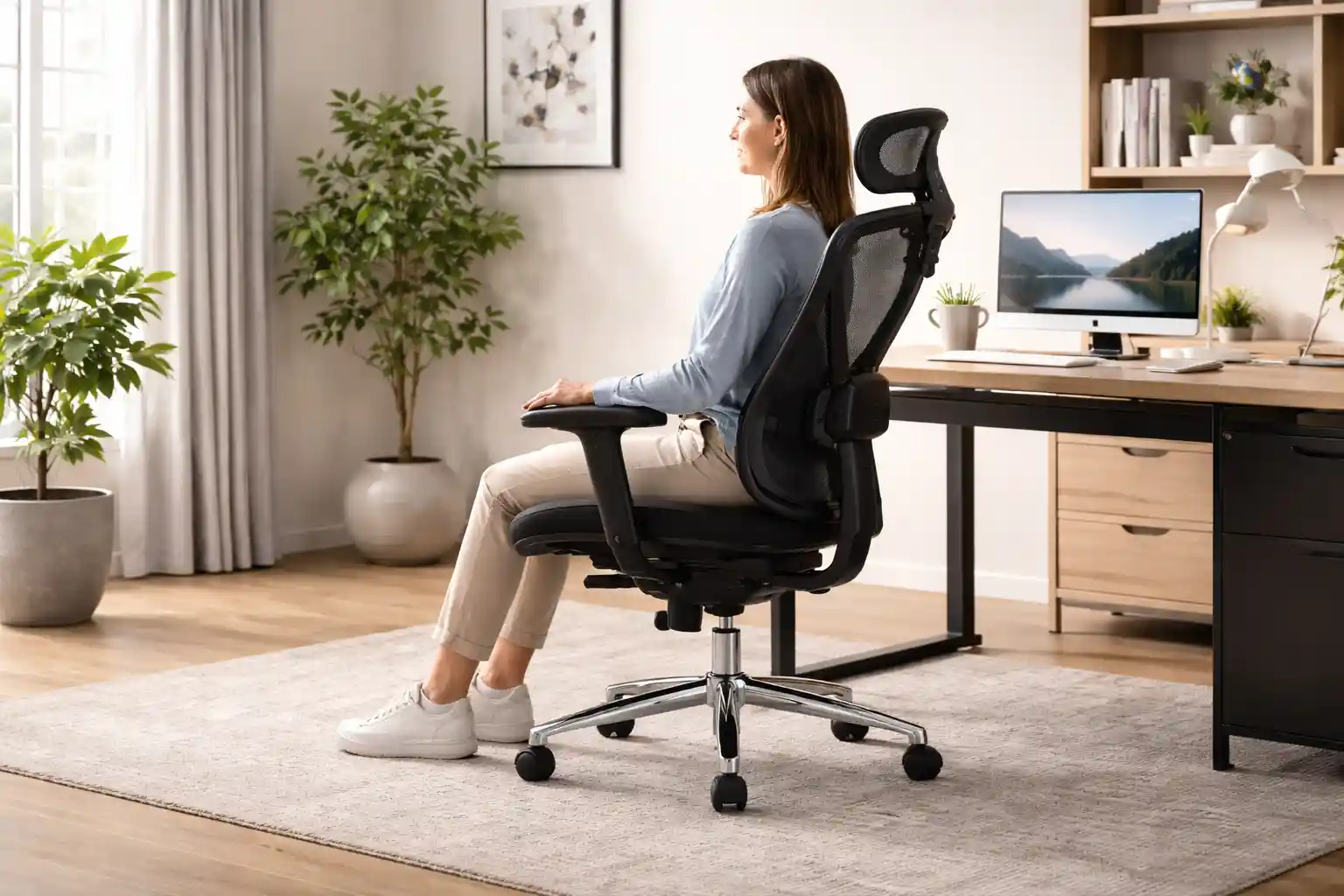
Learning the correct sitting posture for back pain starts with understanding how every part of your body should align.
Head Position
Your head should stay directly above your shoulders, not pushed forward.
A forward head posture adds extra stress to the neck and upper spine.
Tips:
- Keep your chin parallel to the floor
- Avoid looking downward for long periods
- Position screens at eye level
- Relax your jaw and facial muscles
Imagine a string gently pulling the top of your head upward.
Neck Alignment
Your neck should remain neutral and relaxed.
Avoid:
- bending downward
- tilting sideways
- craning toward the monitor
A neutral neck reduces tension headaches and upper back strain.
Good habit:
Keep your ears aligned with your shoulders.
Shoulder Posture
Your shoulders should stay relaxed, not rounded forward.
Many people unconsciously lift or hunch their shoulders while typing.
Correct shoulder posture:
- Keep shoulders down and relaxed
- Avoid tightening shoulder muscles
- Open your chest naturally
- Keep shoulder blades slightly back
This helps improve breathing and reduces upper back tension.
Lower Back Support
Your lower back needs consistent support throughout the day.
The natural inward curve of the spine should remain supported by your chair.
How to improve lumbar support:
- Use a chair with built-in lumbar support
- Place a small cushion behind the lower back
- Sit fully back in the chair
- Avoid sitting on the edge
Proper lumbar support is essential for an ergonomic sitting position.
If you sit for long hours daily, don’t miss our list of best chairs for long sitting hours designed for comfort.
Hip Positioning
Your hips should sit slightly higher than your knees.
This positioning helps maintain spinal alignment and reduces pressure on the lower back.
Important tips:
- Sit deep into the chair
- Avoid tilting the pelvis backward
- Keep weight evenly distributed
Knee Angle
Your knees should form about a 90-degree angle.
Feet Placement
Your feet should remain flat on the floor.
Avoid:
- dangling feet
- sitting cross-legged for long periods
- tucking feet under the chair
If your feet do not reach the floor comfortably, use a footrest.
Good foot positioning improves circulation and spinal stability.
Arm and Elbow Position
Your arms should stay relaxed beside your body.
Ideal elbow position:
- elbows bent around 90 degrees
- forearms parallel to the floor
- wrists straight while typing
Avoid reaching too far for your keyboard or mouse.
Monitor Height
Poor monitor placement is one of the biggest posture mistakes in modern workspaces.
Correct monitor setup:
- top of screen at eye level
- monitor about arm’s length away
- center of screen directly in front of you
This prevents neck bending and shoulder strain.
Desk Setup Basics
Your desk setup affects your entire posture.
Simple ergonomic desk rules:
- keyboard close to your body
- mouse within easy reach
- elbows relaxed while typing
- thighs parallel to the floor
A proper workspace can dramatically reduce back pain while sitting.
Best Ergonomic Sitting Position
The best sitting position for work keeps your body balanced and supported without unnecessary tension.
The 90-Degree Rule
A common ergonomic guideline is the 90-degree rule.
Your:
- knees should bend around 90 degrees
- elbows should stay near 90 degrees
- hips should remain near 90 degrees
This creates balanced body alignment.
Looking for affordable options? See our picks for best office chairs under $200 without compromising comfort.
Maintain a Neutral Spine
A neutral spine means your back maintains its natural curves without excessive arching or slouching.
Signs of neutral spine posture:
- chest open
- shoulders relaxed
- lower back supported
- head aligned over shoulders
This is the foundation of a healthy office chair posture guide.
Use Proper Lumbar Support
Lumbar support helps maintain the lower spine curve naturally.
Without it, the lower back collapses and muscles overwork to stabilize the body.
Keep the Screen at Eye Level
Looking down at a laptop all day can create severe neck and upper back tension.
Use:
- monitor stands
- laptop risers
- external keyboards
This improves posture immediately.
Keep Feet Flat on the Floor
Feet provide stability and help evenly distribute body weight.
A stable base reduces pressure throughout the spine.
Common Sitting Mistakes That Cause Back Pain
Many posture habits seem harmless but slowly create chronic pain.
Crossing Legs
Crossing legs may feel comfortable temporarily, but it can:
- tilt the pelvis
- misalign the spine
- reduce circulation
Try keeping both feet flat instead.
Leaning Forward
Leaning toward the screen increases spinal pressure dramatically.
This posture often causes:
- neck pain
- upper back tension
- shoulder tightness
Slouching
Slouching compresses the chest and strains spinal discs.
Over time, it weakens core muscles and encourages poor posture habits.
Sitting Too Low
A chair that sits too low forces your knees upward and rounds the lower back.
Adjust chair height so hips stay slightly above knees.
Unsupported Lower Back
Without lumbar support, the lower spine loses its natural curve.
This is one of the most common reasons people experience lower back pain while sitting.
How to Sit Properly While Working Long Hours
Even the best posture is not enough if you stay seated all day.
Movement matters just as much as posture.
Take Stretching Breaks
Stand and stretch every 30–60 minutes.
Simple stretches can:
- loosen tight muscles
- improve circulation
- reduce stiffness
- refresh posture
Helpful desk stretches:
- neck rolls
- shoulder shrugs
- seated spinal twists
- hamstring stretches
Use Standing Intervals
Alternating between sitting and standing reduces spinal pressure.
If possible:
- use a sit-stand desk
- stand during calls
- walk during short breaks
Small movement changes help reduce back pain while sitting.
Set Posture Reminders
Most people lose posture awareness during busy work sessions.
Use:
- phone alarms
- posture apps
- sticky notes
- smartwatch reminders
Frequent reminders help build long-term posture habits.
Adjust Your Ergonomic Chair Properly
Even expensive chairs fail if adjusted incorrectly.
Important chair adjustments:
- seat height
- lumbar support placement
- armrest height
- recline angle
A properly adjusted chair supports your body naturally.
Best Office Chair Features for Good Posture
A quality ergonomic chair can support better posture and reduce spinal stress.
Here are the most important features to look for.
Lumbar Support
Good lumbar support protects the natural lower spine curve.
Adjustable lumbar support is ideal because every body is different.
Adjustable Armrests
Armrests should support relaxed shoulders and elbows.
Proper arm support reduces upper back and neck strain.
Seat Depth
Your seat should support your thighs without pressing behind the knees.
A small gap should remain between the seat edge and your knees.
Headrest Support
A headrest can help reduce neck fatigue during long work sessions.
It is especially useful for people working extended office hours.
Breathable Mesh Material
Breathable chairs improve airflow and comfort during long sitting periods.
Mesh backs also encourage better posture support.
Still confused between materials? Read our detailed mesh vs leather office chair comparison to choose the right one.
Quick Desk Setup Tips
A healthy workspace supports healthy posture.
Monitor Distance
Keep the monitor about an arm’s length away.
Too-close screens increase eye strain and neck tension.
Keyboard Placement
Your keyboard should allow relaxed elbows and straight wrists.
Avoid reaching forward while typing.
Proper Desk Height
Your desk should allow:
- relaxed shoulders
- elbows near 90 degrees
- comfortable typing position
Use a Footrest if Needed
If your feet cannot rest flat on the floor, use a footrest to improve stability and posture.
FAQs
What is the healthiest sitting position?
The healthiest sitting position keeps your spine neutral, shoulders relaxed, feet flat on the floor, and knees around a 90-degree angle.
Is sitting straight good for back pain?
Yes, but avoid overly rigid posture. The goal is a relaxed neutral spine with proper lumbar support, not stiff upright sitting.
How often should I stand up while working?
Experts generally recommend standing or moving every 30 to 60 minutes to improve circulation and reduce spinal pressure.
Can office chairs reduce back pain?
Yes. A good ergonomic office chair with lumbar support and adjustable features can significantly improve posture and reduce discomfort.
Why does my lower back hurt while sitting?
Lower back pain while sitting often comes from poor posture, weak core muscles, lack of lumbar support, prolonged sitting, or improper desk setup.
Conclusion
Learning how to sit properly to avoid back pain can improve your comfort, posture, and long-term spinal health.
Small changes make a big difference:
- keep your spine neutral
- support your lower back
- keep feet flat
- position screens correctly
- take regular movement breaks
Good posture is not about sitting perfectly all day. It is about creating healthy habits that reduce strain over time.
If you spend long hours working at a desk, investing in an ergonomic setup and supportive office chair can help protect your back and improve daily comfort.
Want more options? Explore more office chair guides to find the perfect chair for your needs.