Does your back hurt after a few hours of work? Do you constantly adjust your chair trying to get comfortable? Maybe your desk feels cramped, your monitor sits too low, or your workspace becomes messy by lunchtime.
These problems are common for people working from home.
Many remote workers and students spend long hours sitting without realizing that a poor workspace setup can quietly affect posture, comfort, energy levels, and productivity. Small issues eventually become bigger problems.
The good news is that you don’t need an expensive renovation to build a better workspace.
A few smart changes can create an ergonomic home office setup that helps you feel comfortable, stay focused, and work more efficiently.
This complete guide covers the best Home Office Setup Ideas for 2026, whether you have a large office room or a small corner in your apartment.
Quick Home Office Setup Checklist
| Element | Recommended Setup |
|---|---|
| Chair | Adjustable ergonomic chair with lumbar support |
| Desk | Elbows around 90 degrees while typing |
| Monitor Height | Top of screen at eye level |
| Lighting | Natural light plus task lighting |
| Keyboard Position | Wrists neutral and elbows relaxed |
| Storage | Drawers, shelves, desk organizers |
| Accessories | Footrest, laptop stand, monitor arm, wrist support |
Best Home Office Setup Ideas
Ergonomic Chair Setup
Your chair has one of the biggest impacts on comfort and productivity.
A poor chair can lead to:
- Lower back pain
- Shoulder tension
- Neck strain
- Poor posture
- Fatigue
For a comfortable office setup, look for:
- Adjustable seat height
- Lumbar support
- Adjustable armrests
- Breathable material
- Proper seat depth
Your feet should rest flat on the floor and your knees should remain around a 90-degree angle.
People working long shifts should especially invest in a desk setup for long hours because sitting in an unsupportive chair daily can create long-term discomfort.
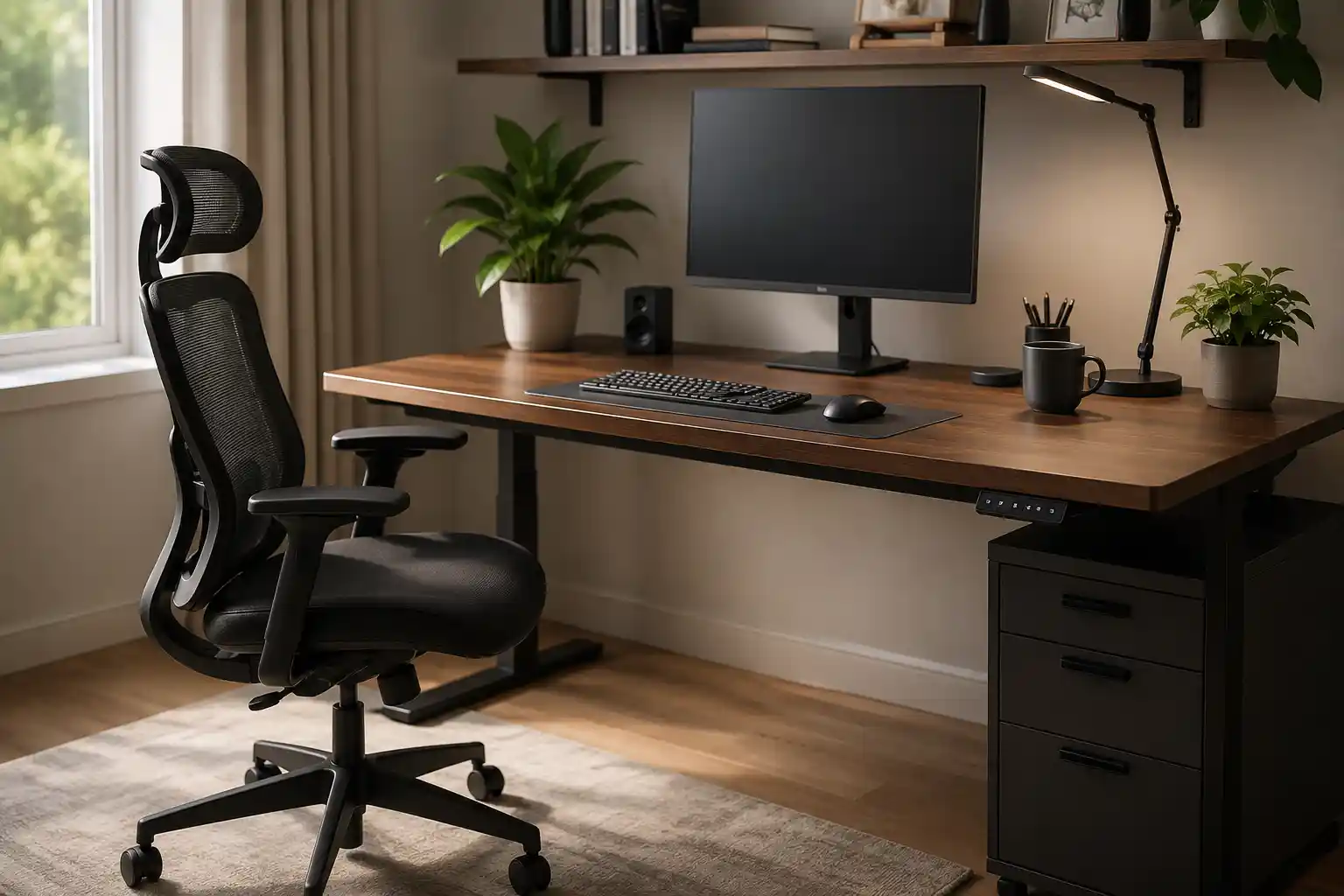
Best Mesh Office Chair for Comfort and Long Working Hours
If you spend several hours working at a desk, your chair can directly affect your comfort, posture, and productivity. Mesh office chairs have become a popular choice because they provide excellent airflow, reduce heat buildup, and offer better support during long work sessions.
A good mesh chair can help reduce pressure on your lower back, improve sitting posture, and make your work-from-home setup significantly more comfortable.
- Breathable mesh back support
- Adjustable lumbar support
- Comfortable for long sitting sessions
- Better airflow and reduced sweating
- Suitable for home offices and professional workspaces
Proper Desk Height Setup
Desk height matters more than many people think.
When your desk sits too high:
- Shoulders rise
- Wrists bend unnaturally
- Neck tension increases
When your desk sits too low:
- You hunch forward
- Posture suffers
- Back strain increases
For an ideal work from home desk setup:
- Elbows should rest near 90 degrees
- Wrists should stay straight
- Forearms should remain parallel to the floor
Standing desks continue growing in popularity in 2026 because they allow users to switch positions during the day.
Monitor Placement Tips
Many people place their monitor too low and spend the entire day looking downward.
This simple mistake often causes:
- Neck pain
- Shoulder stiffness
- Eye strain
- Poor posture
For better comfort:
- Place the top of the monitor at eye level
- Keep screens roughly an arm’s length away
- Position dual monitors evenly if used frequently
- Center your main display directly in front of you
Laptop users should consider using a laptop stand with an external keyboard.
Lighting for Productivity
Lighting can influence both comfort and concentration.
Poor lighting may cause:
- Headaches
- Eye strain
- Fatigue
- Reduced focus
Helpful productive workspace ideas include:
- Positioning your desk near natural light
- Using warm desk lamps for evening work
- Reducing screen glare
- Adding adjustable task lighting
Natural light can also improve mood and help maintain energy levels throughout the day.
Small Space Home Office Ideas
Not everyone has a dedicated office room.
Fortunately, there are plenty of home office ideas for small spaces.
Try these solutions:
- Wall-mounted desks
- Foldable desks
- Corner workstations
- Floating shelves
- Vertical storage systems
- Compact monitor arms
Even a quiet corner in a bedroom or living room can become a highly functional workspace.
Focus on organization rather than size.
Minimalist Workspace Setup
Minimalist setups remain popular because clutter often creates mental distractions.
Simple workspace ideas include:
- Keeping only essential items on the desk
- Using hidden storage
- Choosing wireless accessories
- Reducing visual clutter
- Using neutral colors
A cleaner workspace often creates a calmer environment and helps improve focus.
Home Office Setup for Back Pain Relief
Back pain remains one of the biggest complaints among remote workers.
A home office setup for back pain should prioritize posture and support.
Helpful improvements include:
- Lumbar cushions
- Footrests
- Adjustable chairs
- Sit-stand desks
- Monitor arms
- Regular movement breaks
You should also avoid staying in one position for several hours.
Standing, stretching, and walking briefly throughout the day can reduce discomfort significantly.
Related Guide: How to Fix Back Pain from Sitting All Day
Long hours of sitting can put extra pressure on your spine, weaken muscles, and lead to stiffness in your lower back, shoulders, and neck. Many remote workers experience discomfort because of poor posture, improper chair support, and lack of movement throughout the day.
The good news is that small adjustments can make a big difference. Learn practical ways to improve sitting posture, reduce pressure on your back, choose the right ergonomic support, and prevent pain during long work sessions.
Read Full Guide →Cable Management Ideas
Messy cables can quickly ruin an otherwise clean workspace.
Simple cable management ideas:
- Cable sleeves
- Under-desk trays
- Cable clips
- Velcro straps
- Wireless accessories
- Labeling cords
A cleaner desk usually feels more organized and less distracting.
Productivity Accessories
The right accessories can improve both comfort and efficiency.
Useful additions include:
- Laptop stands
- Footrests
- Monitor arms
- Noise-canceling headphones
- Ergonomic keyboard
- Wireless mouse
- Wrist rests
- Desk organizers
Choose accessories that solve actual problems instead of adding unnecessary clutter.
Improve Your Work Performance with the Right Chair
Spending long hours in an uncomfortable chair can reduce focus, increase fatigue, and lead to neck or back pain. The right office chair helps support posture, improves comfort, and makes daily work sessions more productive.
Whether you work remotely, study for hours, or spend your day at a desk, choosing a chair designed for comfort and support can make a noticeable difference in your energy and efficiency.
Read: Best Chair for Productivity at Work →Common Home Office Mistakes
Avoid these common mistakes when building your workspace:
Monitor Too Low
Constantly looking down increases neck strain.
Poor Chair Support
An uncomfortable chair can lead to long-term posture issues.
Wrong Sitting Posture
Slouching puts pressure on your back and shoulders.
Cluttered Workspace
Too many items create distractions and reduce efficiency.
Ignoring Breaks
Even the perfect workspace cannot replace movement.
Related Guide: Best Stretches for Office Workers
Sitting for long hours can lead to tight shoulders, neck stiffness, lower back pain, and reduced mobility. Even with a perfect office chair and ergonomic desk setup, staying in the same position all day can create discomfort over time.
Simple stretching exercises can help improve posture, reduce muscle tension, increase blood circulation, and keep your body feeling more comfortable during work hours.
- Neck and shoulder stretches
- Lower back relief exercises
- Wrist and hand stretches
- Hip-opening movements
- Quick desk stretches you can do in under 5 minutes
Home Office Buying Guide
How to Choose a Chair
Look for:
- Adjustable lumbar support
- Adjustable armrests
- Breathable material
- Seat depth adjustment
- Weight capacity
Avoid selecting chairs based only on appearance.
Desk Size Considerations
Desk size depends on your equipment.
Typical recommendations:
- Small setup: 40–48 inches
- Standard setup: 48–60 inches
- Multiple monitors: 60–72 inches
Monitor Selection
For most users:
- 24–27 inches works well
- Full HD or higher resolution
- Adjustable height preferred
Lighting Selection
Good lighting should:
- Reduce glare
- Be adjustable
- Match your work environment
- Support daytime and evening work
Comfort Accessories
Consider adding:
- Seat cushions
- Footrests
- Monitor arms
- Wrist supports
- Anti-fatigue mats
According to Mayo Clinic , poor posture, prolonged sitting, and weak core muscles are some of the most common causes of lower back pain in office workers.
Frequently Asked Questions
What is the ideal home office setup?
An ideal setup includes an ergonomic chair, proper desk height, eye-level monitor placement, good lighting, and minimal distractions.
How can I make my desk more ergonomic?
Adjust your chair height, keep elbows at 90 degrees, raise your monitor to eye level, and maintain neutral wrist positioning.
How do I reduce back pain while working?
Use proper lumbar support, improve posture, take movement breaks, and avoid sitting for long periods.
What should every home office have?
Every workspace should have:
- Comfortable chair
- Proper desk
- Monitor
- Lighting
- Storage
- Productivity accessories
How much space is needed for a home office?
A functional workspace can fit into as little as 20–30 square feet with smart organization.
Conclusion
Creating a better workspace does not always require expensive furniture or a dedicated office room.
Small improvements often make the biggest difference.
Start with the basics:
- Improve your chair
- Adjust desk height
- Raise your monitor
- Reduce clutter
- Add supportive accessories
Over time, these changes can create a more comfortable office setup that supports productivity, reduces back pain, and makes working from home much more enjoyable.
The best home office setup is not necessarily the most expensive one. It is the setup that helps you stay comfortable, healthy, and productive every day.
Explore more expert guides inside our Tips & Setup category, including ergonomic sitting tips, posture improvement guides, office chair advice, and daily habits to reduce lower back pain naturally.
1 thought on “Home Office Setup Ideas (2026 Guide): Create a Comfortable and Productive Workspace”