Finding a comfortable office chair is not just about choosing a chair with thick padding or a high price tag. A chair can look excellent in photos and still feel completely wrong once you sit in it.
The problem is often fit.
If your feet cannot comfortably reach the floor, the seat pushes against the backs of your knees, your shoulders feel tense, or the lumbar support sits in the wrong place, the chair may simply not match your body proportions.
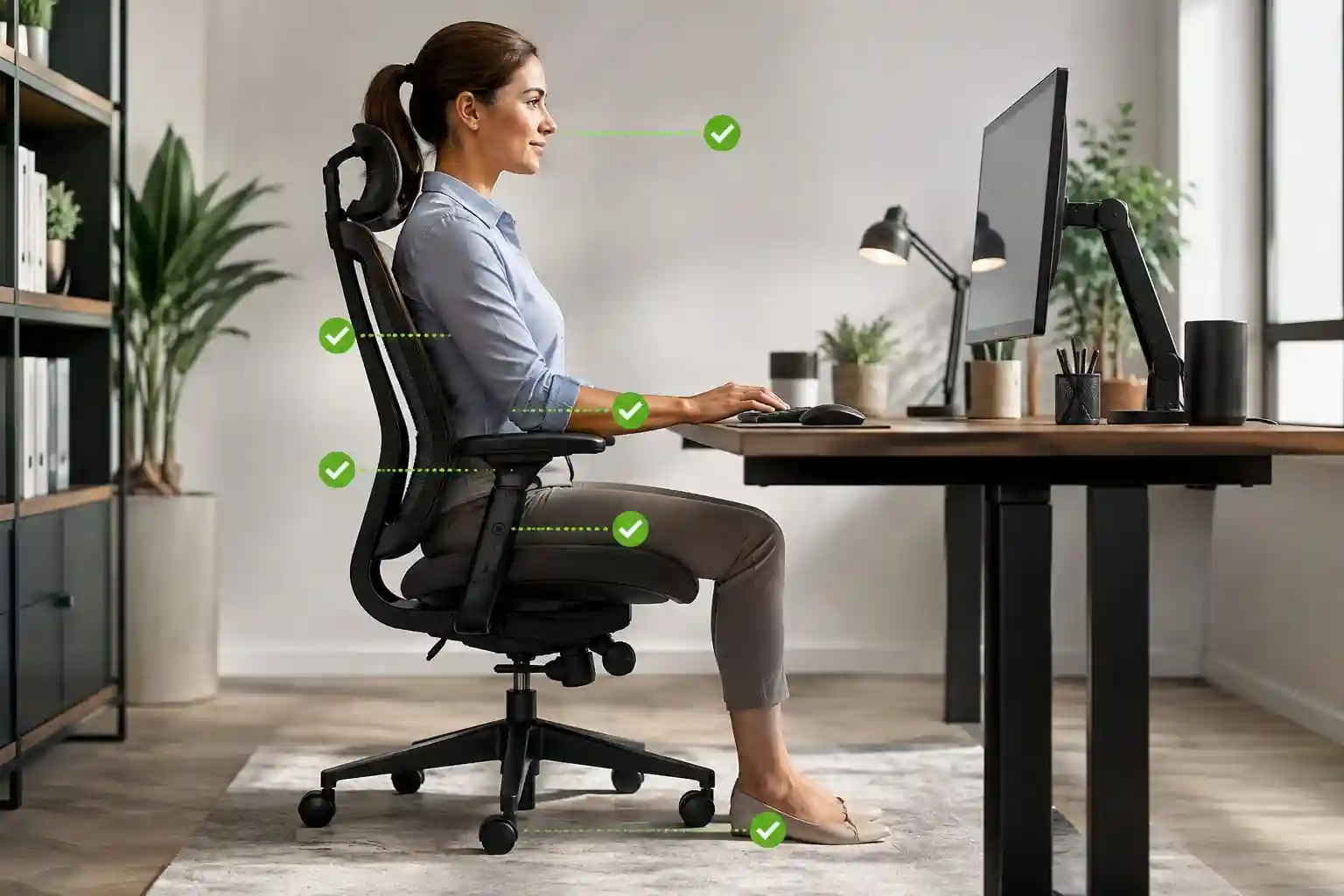
So, how to tell if an office chair fits you? The answer is to look at several points at the same time: seat height, seat depth, back support, armrests, foot position, and the relationship between your chair and desk.
This office chair fit guide walks through those checks step by step. Whether you work from home, study, program, or spend several hours at a desk, the goal is to help you understand whether your current chair is properly sized and adjusted for you.
Quick note: There is no single chair position that is perfect for every person. Body proportions, desk height, working habits, and comfort preferences vary. Use these guidelines as practical starting points and adjust the chair based on how it fits you.
Quick Office Chair Fit Checklist
Use this quick checklist before spending time fine-tuning your chair.
| Area | What a good fit generally looks like |
|---|---|
| Feet | Feet have stable support rather than dangling |
| Knees | Knees are comfortable and not forced into an awkward position |
| Seat height | Feet can be supported while your working position remains comfortable |
| Seat depth | There is comfortable space between the seat edge and the backs of your knees |
| Lower back | Lumbar support lines up reasonably well with your lower back |
| Shoulders | Shoulders can remain relaxed instead of being pushed upward |
| Armrests | Elbows and forearms can be supported without forcing your shoulders up |
| Head/neck | Headrest, if present, does not push your head unnaturally forward |
| Desk | Keyboard and mouse can be reached without excessive reaching |
| Monitor | Screen can be positioned comfortably without constantly bending your neck |
If several items on this list are difficult to achieve, your chair may need better adjustment—or it may simply be the wrong size for you.
What Does a Properly Fitted Office Chair Feel Like?
A properly fitted chair should feel stable without feeling restrictive.
You should be able to sit with your feet supported, use your keyboard and mouse comfortably, and change positions without constantly fighting the chair.
Some useful signs include:
- Your feet have reliable support.
- You are not constantly sliding forward on the seat.
- Your lower back can contact the backrest comfortably.
- Your shoulders remain relatively relaxed.
- Your elbows can stay near your body while working.
- The seat provides enough usable space without pressing into your knees.
- You can recline or change position without feeling trapped.
- The chair does not force you into one rigid posture.
Remember that good ergonomics is not about sitting perfectly still for hours. A chair should allow reasonable movement and adjustment.
Step 1: Check Your Seat Height
Seat height is one of the first things to check when learning how should an office chair fit.
Sit all the way back in the chair and place your feet on the floor. Adjust the seat height until your feet have stable support while your legs feel comfortable.
If the chair is too high, you may find yourself unable to place your feet securely on the floor. Some people compensate by sitting forward or using a footrest.
If it is too low, the relationship between your chair, desk, keyboard, and mouse may become uncomfortable.
How to adjust office chair height
- Sit fully back in the chair.
- Place both feet where they can be comfortably supported.
- Raise or lower the seat using the chair’s height mechanism.
- Check your relationship with the desk.
- Make small adjustments until the overall setup feels natural.
Your chair and desk need to work together. You should not judge seat height independently from your workstation.
Step 2: Check the Seat Depth
Office chair seat depth is one of the most overlooked parts of chair fit.
Seat depth refers roughly to how far the usable seat extends from the backrest toward the front edge.
To check it, sit toward the back of the chair and notice the space between the front edge of the seat and the backs of your knees.
You want enough support from the seat without the front edge pressing uncomfortably against your legs.
What if the seat is too deep?
A seat that is too deep for your body can make it difficult to sit comfortably against the backrest while maintaining good foot support. You may end up sliding forward to compensate.
What if the seat is too shallow?
A seat that is too shallow may not provide enough support underneath your thighs, making the chair feel cramped.
This is why adjustable seat depth can be particularly useful. People with different leg lengths can position the seat to better match their proportions.
When shopping, don’t look only at the overall chair dimensions. Check the manufacturer’s listed seat depth and determine whether the adjustment range is appropriate for you.
Step 3: Check the Lumbar Support
Lumbar support should generally sit against the lower portion of your back rather than being positioned too high or too low.
If your chair has adjustable lumbar support, experiment with both its height and depth.
Sit back normally and determine whether the lumbar area feels like it is supporting the natural curve of your lower back without aggressively pushing you forward.
Look for adjustable lumbar support
An adjustable system can be useful because people’s torso lengths and preferred sitting positions differ.
If the lumbar support is fixed, pay particular attention to its position before purchasing the chair.
Poor lumbar positioning may simply make the chair feel awkward or uncomfortable. It doesn’t necessarily mean the chair is defective; it may mean its geometry doesn’t match your body.
Step 4: Check the Backrest
The backrest should provide useful support while allowing you to move naturally.
When sitting, your back should be able to contact the backrest without requiring you to constantly lean forward.
Consider these adjustments if your chair provides them:
- Backrest height: Helps position the support relative to your torso.
- Recline: Allows you to change your sitting position.
- Tilt tension: Controls how easily the backrest moves.
- Tilt lock: Can be useful if you prefer a particular reclined position.
You don’t necessarily need to remain perfectly upright all day. Being able to change positions can make a chair feel more natural during long work sessions.
Step 5: Check the Armrests
Armrests should support your arms without forcing your shoulders upward.
Start by sitting normally and letting your shoulders relax. Adjust the armrests so your forearms can receive support when appropriate without creating tension.
Pay attention to your keyboard and mouse position as well.
If the armrests are too high, you may feel as though your shoulders are being pushed upward. If they are too low, you may not be able to use them effectively.
Armrest width also matters. If the armrests are too far apart, your elbows may have to move away from your body. If they are too close, your arms may feel restricted.
Adjustable height and width can make a significant difference when trying to achieve a proper office chair fit.
Step 6: Check Your Feet and Legs
One of the simplest checks is also one of the most important:
How should your feet sit in an office chair?
Your feet should have stable support. If they are dangling, your chair height or overall workstation setup may need adjustment.
Also pay attention to the front edge of the seat. You should not feel excessive pressure where the seat meets the backs of your knees.
Shorter users may find that a chair’s minimum seat height is especially important. If lowering the chair still doesn’t allow comfortable foot support, a suitable footrest can sometimes help complete the setup.
The important point is to consider the entire workstation rather than forcing your body to adapt to an unsuitable chair height.
Step 7: Check the Chair With Your Desk
Even the right chair can feel wrong when paired with a poorly positioned desk.
Once you have adjusted the chair, check your:
- Keyboard
- Mouse
- Desk height
- Monitor
- Elbows
- Shoulders
You should be able to reach your keyboard and mouse without constantly stretching forward.
If your desk is unusually high, you might raise your chair to reach it comfortably—but that could cause your feet to lose stable support. If your desk is too low, you may have a different set of problems.
This is why ergonomic chair adjustment should be considered part of the entire workstation setup.
For more guidance, see our related guide on how to choose an ergonomic chair.
Signs Your Office Chair Is Too Big
A chair may be too large for you if:
- Your feet don’t comfortably reach the floor.
- The seat is deeper than you can comfortably use.
- You have to slide forward to reach the desk.
- The lumbar support doesn’t line up well with your lower back.
- The armrests are too far apart.
- The backrest feels oversized for your torso.
- You cannot find a comfortable setting even after adjusting the chair.
A chair being physically large doesn’t automatically make it better. More space is useful only when you can actually use it comfortably.
Signs Your Office Chair Is Too Small
A chair may be too small if:
- The seat doesn’t provide enough usable support.
- You feel cramped.
- The seat width doesn’t allow comfortable movement.
- The backrest doesn’t provide enough support for your torso.
- The armrests are too narrow or close together.
- The seat depth is insufficient for your legs.
- You have very little flexibility when adjusting the chair.
If multiple dimensions feel restrictive, increasing the amount of adjustment may not solve the underlying problem.
How to Tell If an Office Chair Fits Before Buying
The best time to check chair fit is before you buy.
Start by measuring yourself and comparing those measurements with the manufacturer’s specifications.
Look for:
- Adjustable seat height
- Adjustable seat depth
- Seat width
- Lumbar adjustment
- Adjustable armrests
- Recline adjustment
- Weight capacity
- Backrest dimensions
- Warranty
- Return policy
Don’t assume that a chair marketed as “ergonomic” will automatically fit you.
Manufacturer dimensions can tell you much more than marketing language. Pay particular attention to the minimum and maximum adjustment ranges.
A generous adjustment range can be especially valuable if you’re unsure which chair size will suit your proportions.
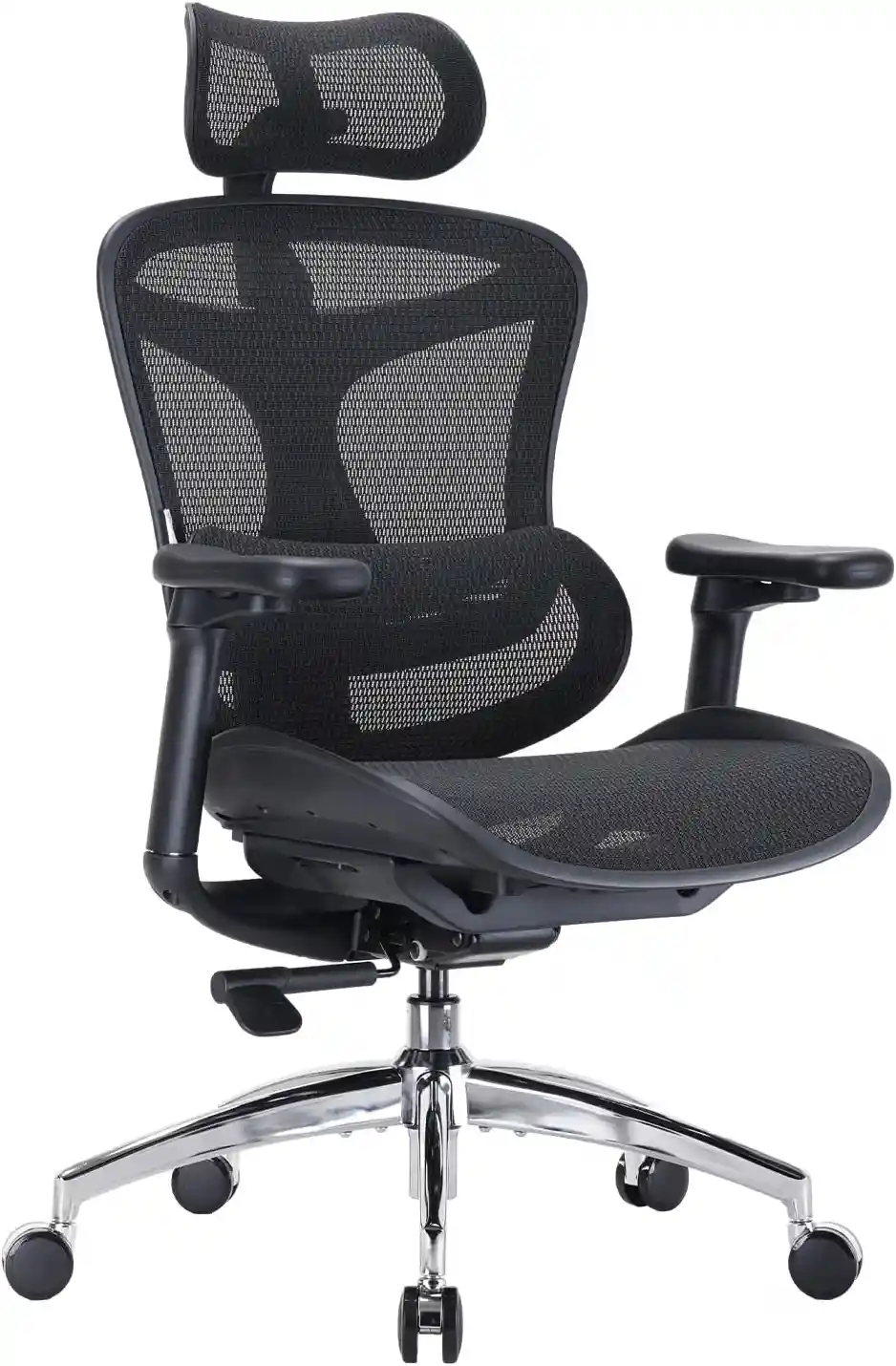
SIHOO Doro C300 Ergonomic Office Chair
If you’re looking for an office chair with multiple adjustment options, the SIHOO Doro C300 is worth comparing. It features adjustable armrests, adjustable seat depth, a flexible backrest and lumbar support designed for different sitting positions.
- Adjustable seat depth
- 4D adjustable armrests
- Adjustable backrest and headrest
- Self-adaptive lumbar support
As an Amazon Associate, we may earn from qualifying purchases.
Office Chair Fit for Different Body Types
Shorter Users
Shorter users should pay particular attention to the chair’s minimum seat height and seat depth.
A chair that cannot lower enough may leave your feet without comfortable support. A deep seat may also make it difficult to sit back against the backrest.
Our guide to the best chair for short people can help you focus on the features that matter most.
Taller Users
Taller users often need to pay attention to seat depth, backrest height, and overall adjustment range.
A chair that feels comfortable for someone with shorter legs may provide insufficient usable seat depth for a taller person.
Look beyond the chair’s advertised height and check its actual adjustment specifications.
Larger Users
Larger users should consider seat width, seat construction, weight capacity, and the adjustment range.
A chair should provide enough usable space without making movement feel restricted.
Weight capacity should always be checked against the manufacturer’s specifications rather than estimated from appearance.
Average-Height Users
Being around average height does not mean every office chair will fit automatically.
Two people with similar overall height can have different leg, torso, and arm proportions.
That’s why adjustable features remain valuable even if you don’t consider yourself particularly tall or short.
Office Chair Fit vs. Chair Comfort
Fit and comfort are related, but they are not the same thing.
Fit is largely about whether the chair’s dimensions and adjustment range work with your body.
Comfort is more personal.
One person may prefer a firm seat while another prefers softer cushioning. Some people prefer breathable mesh, while others like the feel of upholstered material.
The same applies to recline and back support.
An expensive chair is not automatically the right chair for you. A less expensive chair with dimensions and adjustments that suit your body may feel better than a premium chair that doesn’t.
For material comparisons, see our guide to mesh vs. leather office chairs.
How Long Does It Take to Adjust to a New Office Chair?
Don’t assume the first setting you try is the final one.
When you get a new chair, spend some time experimenting with its adjustments. Change one setting at a time rather than moving everything simultaneously.
For example:
- Set the seat height.
- Check your feet and legs.
- Adjust the seat depth.
- Position the lumbar support.
- Adjust the armrests.
- Experiment with recline and tilt tension.
- Recheck your keyboard, mouse, and monitor.
Small changes can make it easier to understand which adjustment affects your comfort.
If you continually need to sit in an unusual position to make the chair work, however, the problem may be the chair’s dimensions rather than your adjustment technique.
Buying Guide: 10 Things to Check
Before purchasing an ergonomic office chair, run through these ten points:
1. Seat Height
Make sure the adjustment range works with your leg length and desk.
2. Seat Depth
Check whether the seat can provide adequate support without pressing against the backs of your knees.
3. Seat Width
Make sure there is enough usable space for comfortable sitting and movement.
4. Lumbar Support
Look for a lumbar position and adjustment range that can work with your torso.
5. Backrest
Consider its height, shape, recline, and movement.
6. Armrests
Look for enough height and width adjustment to accommodate your arms and workstation.
7. Recline
A chair that allows you to change positions can provide more flexibility during long work sessions.
8. Cushioning
Choose cushioning based on your personal preference and how it feels during normal use.
9. Weight Capacity
Check the manufacturer’s stated capacity before buying.
10. Return Policy
A return policy is particularly useful when buying a chair online because you cannot test the fit beforehand.
If you’re comparing chairs for extended work sessions, you may also want to read our guide to the best chair for long hours.
Frequently Asked Questions
How do I know if my office chair is too big?
Common signs include feet that cannot comfortably reach the floor, excessive seat depth, armrests that are too far apart, and difficulty reaching your desk while keeping your back against the backrest.
How do I know if my office chair is too small?
A chair may be too small if the seat feels cramped, the seat depth is insufficient, the backrest doesn’t provide enough usable support, or the armrests don’t give you enough room.
Should my feet touch the floor in an office chair?
Ideally, your feet should have stable support rather than dangling. If the chair cannot be lowered enough for comfortable foot support, a suitable footrest may help complete the setup.
How much space should be behind your knees?
There should be comfortable clearance between the front edge of the seat and the backs of your knees. The exact amount can vary because people’s leg proportions and seat designs differ.
Should your back touch the office chair?
Your back should generally be able to contact the backrest comfortably. You shouldn’t have to constantly lean away from the backrest or slide forward to work at your desk.
Should armrests touch your elbows?
Armrests should be positioned so they can comfortably support your arms when appropriate without pushing your shoulders upward or forcing your elbows into an awkward position.
Is an adjustable office chair better for different body types?
Adjustability can make it easier to accommodate different body proportions. Useful adjustments may include seat height, seat depth, armrests, lumbar support, and recline. However, adjustment range still needs to be appropriate for the individual user.
Conclusion
Learning how to tell if an office chair fits you is less about finding one “perfect” posture and more about checking whether the chair works with your body and workstation.
Start with the basics: make sure your feet have stable support, check the seat depth, position the lumbar support appropriately, adjust the backrest, and make sure the armrests don’t interfere with relaxed shoulders and comfortable desk work.
When buying a new chair, don’t rely solely on appearance, brand reputation, or price. Compare the manufacturer’s dimensions and adjustment ranges with your own body measurements.
Most importantly, remember that people have different proportions and comfort preferences. The best office chair is not necessarily the most expensive one—it’s the one whose dimensions and adjustments allow you to create a comfortable, flexible workstation.
Before buying your next office chair, use this fit checklist to compare the chair’s dimensions with your own body measurements.
For a broader setup guide, you can also read how to adjust your office chair for perfect posture.