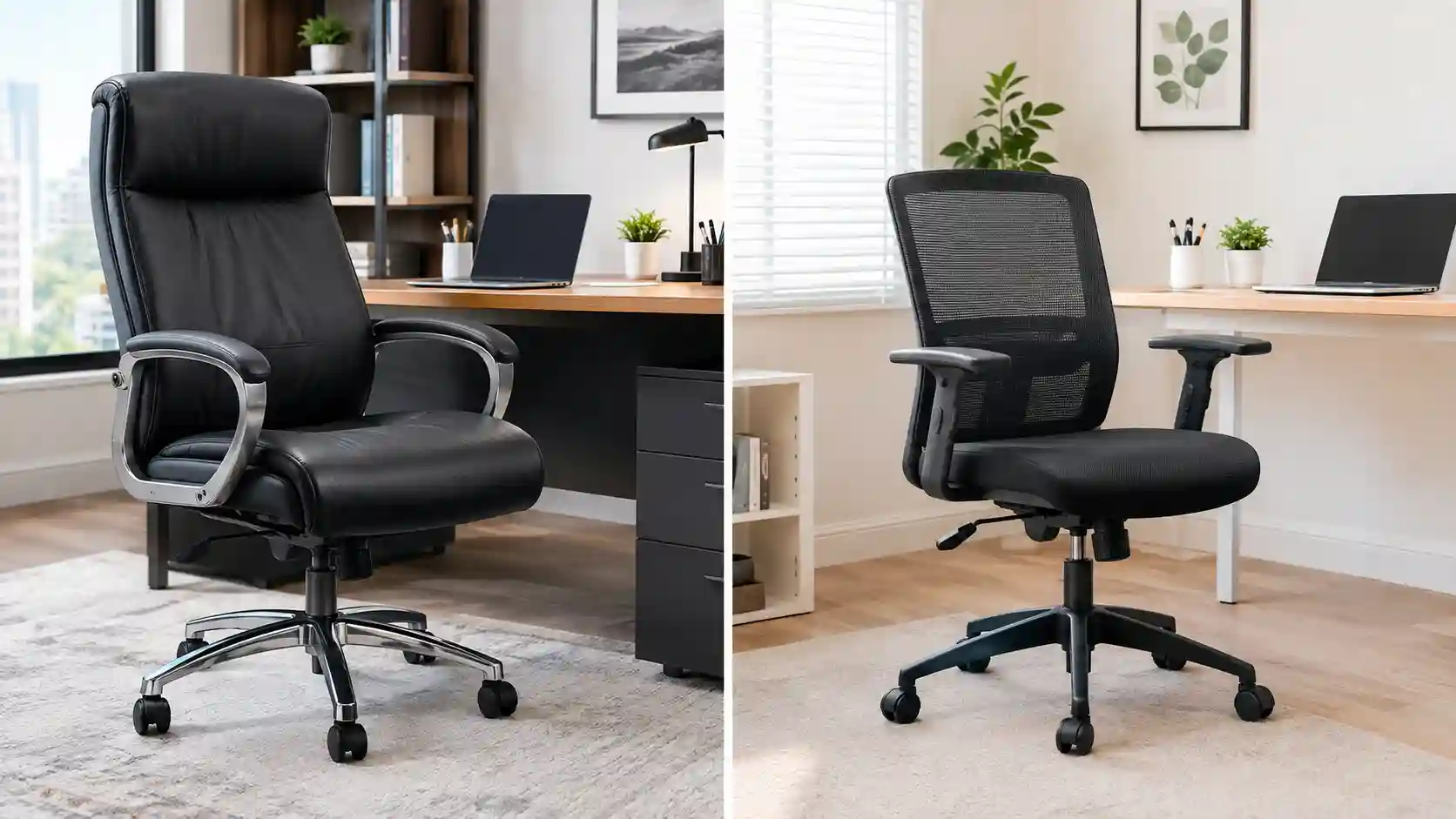
Shopping for a new desk chair can be confusing. You may see terms like office chair, task chair, ergonomic chair, executive chair, and desk chair used across different product listings.
This often leads to one simple question: What is the real difference between an office chair and a task chair?
The answer is that the terms can overlap. An office chair is generally a broad category that includes many types of chairs designed for office or desk use. A task chair is usually more specifically designed for active desk-based work, frequent movement, and everyday computer tasks.
In this Office Chair vs Task Chair guide, we’ll explain the key differences in design, comfort, size, adjustability, back support, workspace needs, and price. You’ll also learn which type may work better for your home office, workday, and personal preferences.
Quick Answer: Office Chair vs Task Chair
An office chair is a broad term for chairs used in offices, home offices, and workspaces. It can include executive chairs, ergonomic chairs, mesh chairs, mid-back chairs, and high-back chairs.
A task chair is generally designed for desk-focused activities such as typing, writing, computer work, studying, and other everyday tasks. Task chairs are often more compact and easier to move around a workstation.
The biggest difference is simple:
- Office chair: A broad category with many styles and comfort levels.
- Task chair: Usually focused on practical desk work, mobility, and compact ergonomic design.
People who want more style choices or a larger chair may prefer an office chair. People with smaller workspaces or active desk routines may prefer a task chair.
However, some modern ergonomic chairs can fit comfortably into both categories.
Office Chair vs Task Chair: Quick Comparison
| Feature | Office Chair | Task Chair |
|---|---|---|
| Primary purpose | General office and desk use | Active desk-based work |
| Design | Broad range of styles | Usually practical and compact |
| Size | Can be small, medium, or large | Often compact to medium |
| Adjustability | Varies by model | Often focused on work adjustments |
| Lumbar support | Depends on chair type | Common on ergonomic models |
| Armrests | May be fixed or adjustable | Often designed for desk movement |
| Backrest | Low, mid, or high-back | Usually low or mid-back, but varies |
| Mobility | Usually includes casters | Usually designed for easy movement |
| Comfort | Can range from basic to premium | Often designed for active work comfort |
| Long-hour use | Depends heavily on features | Depends heavily on features |
| Workspace size | Can require more room | Often suitable for smaller spaces |
| Price range | Budget to premium | Budget to premium |
| Best for | General office use and style preferences | Desk work and frequent movement |
What Is an Office Chair?
An office chair is a general term for a chair designed for use at a desk or in a professional workspace.
Because it is a broad category, office chairs can look very different from one another. Some are large and heavily cushioned, while others are lightweight and minimalist.
Common types of office chairs include:
- Executive chairs
- Ergonomic chairs
- Mesh office chairs
- Mid-back chairs
- High-back chairs
- Leather office chairs
- Task chairs
This is important because a task chair can technically also be considered an office chair.
Typical office chair features may include:
- Adjustable seat height
- Swivel base
- Wheels or casters
- Armrests
- Padded seat
- Recline or tilt
- Back support
The feature list depends on the individual model. A premium ergonomic office chair may offer many adjustments, while a basic office chair may only provide seat-height adjustment.
If you are exploring breathable designs, you may also want to compare the best mesh office chairs for home and office work.
What Is a Task Chair?
A task chair is generally designed for people who spend time performing desk-based tasks.
These tasks can include:
- Typing
- Computer work
- Writing
- Studying
- Customer service work
- Design work
- Administrative tasks
Task chairs often focus on practical movement around a workstation. They may have a compact design that allows the user to move, swivel, and position themselves easily while working.
Many task chairs also include ergonomic features such as:
- Adjustable seat height
- Swivel function
- Rolling casters
- Lumbar support
- Adjustable armrests
- Tilt or recline
However, not every task chair includes all of these features.
A task chair may be a useful option for people who work primarily at a desk and do not want a large executive-style chair taking up extra space.
Main Differences Between an Office Chair and a Task Chair
Design
Office chairs come in many different designs. You can find sleek mesh models, large executive chairs, leather chairs, ergonomic chairs, and basic desk chairs.
Task chairs usually focus more on function. Their design often supports regular desk work and movement around a workstation.
An office chair may prioritize appearance, cushioning, ergonomics, or a combination of these factors. A task chair usually emphasizes practical everyday use.
Size
Office chairs can be quite large, especially executive and high-back models.
Task chairs are often more compact. This can make them easier to use in smaller rooms, apartments, bedrooms, and shared workspaces.
However, size varies by individual model. Some ergonomic task chairs can still have a fairly large footprint.
Adjustability
Adjustability is one of the most important factors when comparing chairs.
A basic office chair may offer only:
- Seat-height adjustment
- Swivel movement
- Simple tilt
A well-designed task chair may offer additional adjustments such as:
- Armrest height
- Lumbar support
- Seat depth
- Tilt tension
- Backrest position
That said, premium office chairs can also provide extensive ergonomic adjustments.
The category name alone does not determine how adjustable a chair is.
Lumbar Support
Some office chairs have built-in lumbar shaping, while others offer adjustable lumbar support.
Task chairs are often marketed for desk work, so ergonomic task models may include lumbar-focused features.
Still, you should always check the individual product specifications. Not every office chair or task chair has adjustable lumbar support.
Armrests
Office chair armrests can range from fixed padded arms to highly adjustable designs.
Task chairs may use adjustable or compact armrests that help users position themselves close to a desk.
For computer work, armrests should not force your shoulders upward or prevent you from getting close enough to your desk.
Backrest
Office chairs can have:
- Low backs
- Mid backs
- High backs
Executive chairs often use larger backrests.
Task chairs commonly use low or mid-back designs, although high-back task chairs are also available.
The best backrest depends on your work habits and preferred sitting position.
Seat Comfort
Office chairs often offer thicker cushioning, particularly executive-style models.
Task chairs may use firmer or more supportive seat designs intended for active desk work.
More cushioning does not automatically mean better comfort. Seat shape, width, depth, and support can all affect how a chair feels.
Mobility
Both chair types commonly use swivel bases and casters.
Task chairs are often designed with workstation movement in mind. This can be useful if you frequently move between a computer, printer, storage area, or different parts of your desk.
Caster performance also depends on the floor type.
Workspace Requirements
A large executive office chair may require more room behind and around the desk.
A compact task chair can be easier to fit into:
- Small apartments
- Bedrooms
- Dorm rooms
- Shared offices
- Small home workspaces
Always check the chair dimensions before buying.
Long-Hour Sitting
Neither “office chair” nor “task chair” automatically means better for long hours.
For extended desk work, look at:
- Seat comfort
- Lumbar support
- Seat depth
- Recline
- Armrest adjustments
- Backrest design
A well-adjusted ergonomic task chair may work very well for long hours. A high-quality ergonomic office chair may also be an excellent option.
Price
Both office chairs and task chairs are available at different price points.
Basic chairs may have limited adjustments, while higher-priced models may offer better materials, mechanisms, warranties, and adjustment options.
Instead of choosing based only on price, compare the features you will actually use.
Office Chair vs Task Chair for Long Hours
If you spend many hours working at a desk, chair quality and adjustability usually matter more than the label on the product.
For long workdays, consider the following features.
Seat Cushioning
The seat should feel supportive without creating uncomfortable pressure during normal use.
Back Support
Look for a backrest shape that supports your preferred working posture.
Lumbar Support
Adjustable lumbar support can help you customize the chair to your body and seating preferences.
Recline
A recline function can provide different seating positions during breaks or changes in tasks.
Seat Depth
A seat that is too deep or too shallow may feel uncomfortable depending on your leg length.
Armrest Adjustments
Adjustable armrests can make it easier to position your arms comfortably while typing or using a mouse.
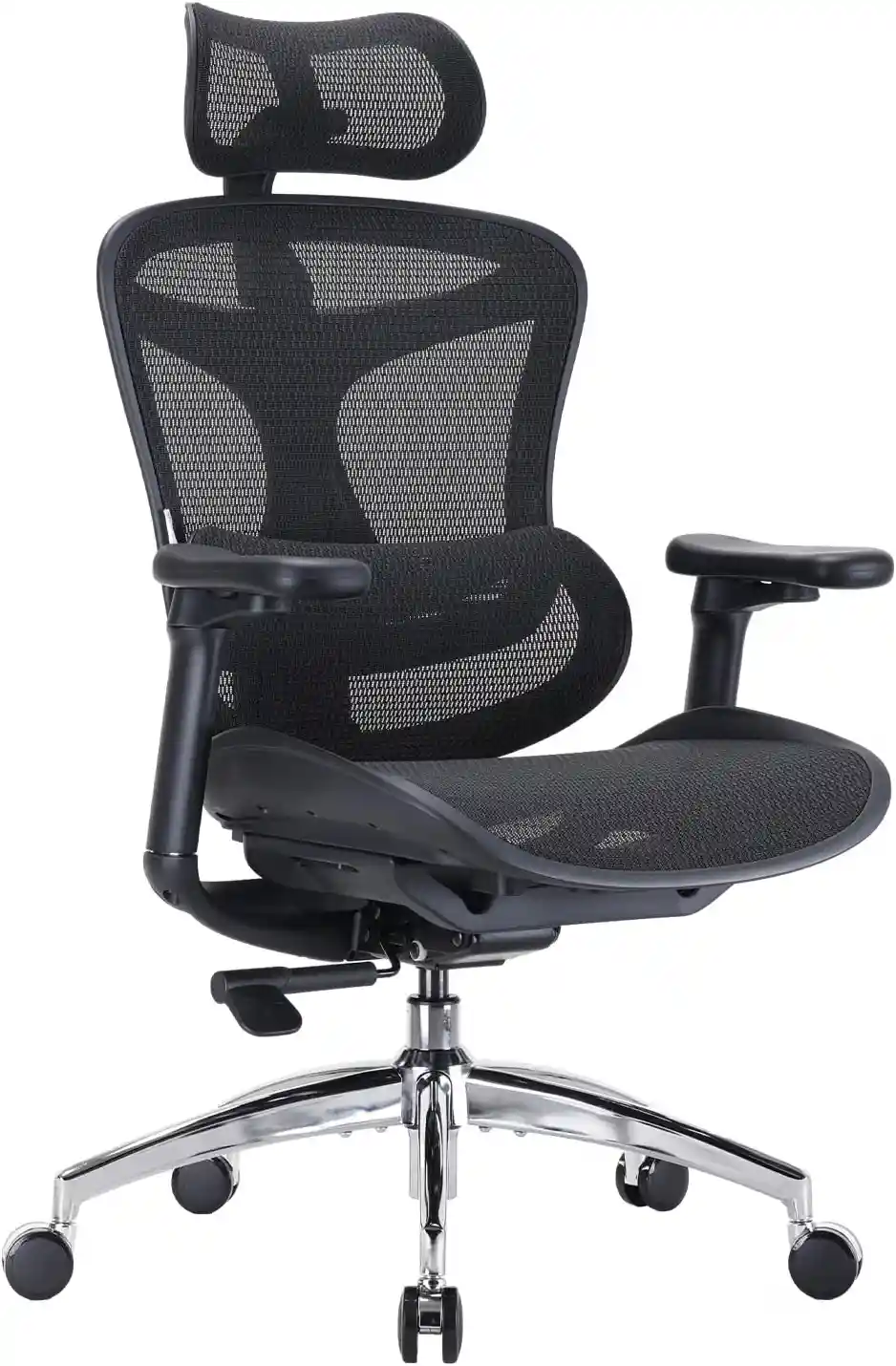
Looking for a chair that combines ergonomic features with a practical design for everyday desk work? The SIHOO Doro C300 is worth comparing before making your final decision.
Recommended Ergonomic Office Chair
SIHOO Doro C300
Looking for a chair that works well for both desk-focused work and long hours? The SIHOO Doro C300 offers an ergonomic design with adjustable support, breathable mesh, and flexible seating features.
- Ergonomic design for desk work
- Breathable mesh back and seat
- Adjustable lumbar support
- Adjustable armrests
- Suitable for home office setups
As an Amazon Associate, I earn from qualifying purchases.
Office Chair vs Task Chair for Work From Home
Working from home creates different challenges than working in a traditional office.
You may be working in:
- A dedicated home office
- A bedroom
- A living room
- A small apartment
- A shared space
Small Apartments
A compact task chair may be easier to fit into a small workspace.
Look for a chair that fits under your desk and does not take up unnecessary floor space.
Dedicated Home Offices
You have more flexibility with size and appearance.
A larger office chair may work well if you want:
- A premium appearance
- More cushioning
- A high-back design
- A larger seat
Bedrooms
A compact task chair can often blend into a bedroom workspace more easily.
Consider whether the chair can fit comfortably under your desk when not in use.
Long Workdays
For full-time work from home, prioritize ergonomic features over appearance alone.
A good chair should match your:
- Body size
- Desk height
- Working hours
- Workspace
- Adjustment needs
Task Chair vs Office Chair for Back Support
When comparing chairs for back support, focus on ergonomic features rather than marketing labels.
Important features include:
Lumbar Support
The chair should provide support that works with your natural seating position. Adjustable lumbar support may allow more personalization.
Adjustable Seat Height
Your seat height should allow you to position yourself appropriately for your desk and work surface.
Seat Depth
Seat depth affects how the chair supports your thighs and how comfortably you can sit against the backrest.
Backrest
A supportive backrest should match your body and allow comfortable positioning during work.
Armrests
Properly positioned armrests may help support your arms while working, but they should not interfere with your desk setup.
Recline
Changing your sitting position occasionally can be more comfortable than remaining in one fixed position.
A chair cannot guarantee the prevention or treatment of back pain. If comfort or pain is a concern, the chair should be considered alongside your overall workstation setup and personal needs.
You can also learn more in our complete ergonomic chair guide.
Pros and Cons of Office Chairs
Pros of Office Chairs
More Styles Available
Office chairs come in a wide variety of designs, materials, and sizes.
Premium Cushioning Options
Some office chairs offer thick padding and large seats.
High-Back Options
High-back chairs are widely available in the office chair category.
Executive Appearance
Executive and leather-style chairs can create a more traditional professional look.
Different Price Ranges
You can find office chairs for budget-conscious buyers as well as premium users.
Cons of Office Chairs
Some Models Are Bulky
Large office chairs may not work well in small rooms.
Adjustability Can Vary
Not every office chair includes advanced ergonomic adjustments.
Appearance May Be Prioritized
Some chairs focus heavily on appearance and offer fewer ergonomic features.
Pros and Cons of Task Chairs
Pros of Task Chairs
Compact Design
Many task chairs work well in smaller workspaces.
Good Mobility
They are often designed for easy movement around a desk.
Suitable for Desk Work
Task chairs are generally designed around everyday computer and desk activities.
Adjustable Features
Many ergonomic task chairs offer useful adjustments.
Good for Smaller Workspaces
Their smaller footprint can be helpful in apartments, bedrooms, and shared offices.
Cons of Task Chairs
Some Have Less Cushioning
Certain task chairs use firmer or thinner seats.
Headrests Are Not Always Included
Many task chairs focus on desk work and may not include a headrest.
Budget Models May Have Limited Adjustments
Lower-priced models may offer only basic functions.
Which Is Better for Different Users?
Best for Work From Home Users
Either can work well.
Choose based on your daily working hours, available space, and ergonomic needs. A task chair may suit a compact desk setup, while a larger office chair may suit a dedicated workspace.
Best for Small Spaces
Task chair is often the better starting point because of its compact design.
Best for Long Hours
Choose the individual chair with better:
- Lumbar support
- Seat comfort
- Adjustability
- Armrests
- Seat depth
- Recline
The category name matters less than the actual features.
Best for Budget Buyers
Compare individual models rather than assuming one category is always cheaper.
A budget task chair may offer useful adjustments, while a budget office chair may offer more cushioning. Check which features matter most to you.
Best for Professionals
Professionals working full days should prioritize ergonomics, durability, comfort, and adjustability.
Both chair types can work.
Best for Users Who Want a Premium Look
A larger executive or premium office chair may be the better choice.
Best for Frequent Movement at a Desk
A task chair may be especially suitable for people who regularly move around their workstation.
Buying Guide: What Should You Look For?
Whether you choose an office chair or task chair, these features deserve attention.
Adjustable Seat Height
The chair should allow you to adjust your sitting height for your desk and workspace.
Seat Depth
A suitable seat depth can improve everyday comfort.
Lumbar Support
Look for lumbar support that feels appropriate for your body and sitting style.
Adjustable Armrests
Adjustable armrests can help you customize your working position.
Comfortable Seat Cushion
Look beyond thickness. Consider the seat shape, support, width, and depth.
Breathable Material
Mesh can provide good airflow, while other materials may offer a different feel and appearance.
Before choosing materials, read our mesh and leather office chair comparison.
Backrest Design
Choose a backrest height and shape that matches your work habits.
Recline and Tilt
These features can give you more flexibility during the workday.
Wheel Type
Check whether the casters are suitable for your floor.
Weight Capacity
Review the manufacturer’s listed weight capacity and overall chair dimensions.
Warranty
A longer warranty may provide additional confidence, but always read what the warranty actually covers.
Return Policy
Check the return window and any conditions before purchasing online.
Quick Buying Checklist
Before buying, ask yourself:
- Does the chair fit my workspace?
- Is the seat height adjustable?
- Is the seat depth suitable?
- Does it offer appropriate lumbar support?
- Are the armrests adjustable?
- Is the material suitable for my environment?
- Does the chair support my daily work routine?
- Are the wheels suitable for my floor?
- Does the warranty meet my expectations?
- Have I checked the return policy?
For a more detailed process, see how to choose the right ergonomic chair.
How to Choose Between an Office Chair and Task Chair
Choose an office chair if:
- You want more style options
- You prefer a larger chair
- You want executive-style comfort
- You have a dedicated office
- Appearance is an important part of your workspace
Choose a task chair if:
- You have limited space
- You work mainly at a desk
- You move frequently
- You prefer a compact design
- You want practical ergonomic adjustments
Remember that some ergonomic chairs fit comfortably into both categories.
Instead of focusing only on the product name, compare the actual specifications.
Related Chair Types to Consider
Ergonomic Chair
An ergonomic chair focuses on adjustable features and support for desk work. It may also be marketed as an office chair or task chair.
Executive Chair
An executive chair is usually larger and designed with a premium or traditional office appearance.
Mesh Office Chair
A mesh chair uses mesh material in part of the backrest and sometimes the seat. It is often chosen by users who prefer airflow.
Gaming Chair
Gaming chairs often have a distinctive appearance and may include high backs and reclining features. Their ergonomics and adjustability vary by model.
Drafting Chair
A drafting chair is designed for taller work surfaces and often includes a foot ring.
Frequently Asked Questions
Is a task chair the same as an office chair?
Not exactly. A task chair can be considered a type of office chair, but the term “office chair” covers a much broader range of designs and styles.
Are task chairs good for long hours?
Some task chairs can work well for long hours, especially models with good seat comfort, lumbar support, seat adjustments, armrest adjustments, and recline features.
What is the difference between a task chair and an ergonomic chair?
A task chair describes how the chair is generally used, while an ergonomic chair describes features designed to improve adjustability and workstation comfort. Some chairs are both task chairs and ergonomic chairs.
Is an office chair better for working from home?
Not always. A task chair may work better in a small home workspace, while a larger office chair may be more suitable for a dedicated office. Features and fit are more important than the category.
Do task chairs have lumbar support?
Some do, but not all. Check whether the chair has built-in or adjustable lumbar support.
Which chair is better for a small home office?
A compact task chair is often a practical choice because it may require less space. However, always check the chair’s actual dimensions.
Final Thoughts: Office Chair vs Task Chair
The main difference in the Office Chair vs Task Chair comparison is that office chair is a broad category, while a task chair is generally more focused on desk work, movement, and practical workspace use.
For small spaces, a compact task chair may be the better choice.
For long hours, choose the chair with the best combination of comfort, lumbar support, seat depth, recline, and adjustability.
For more style options, office chairs provide a wider range of designs, including executive, high-back, leather, mesh, and ergonomic models.
For desk-focused work and frequent movement, a task chair can be an excellent option.
Neither type is automatically better for everyone.
The best choice depends on your:
- Body size
- Working hours
- Workspace size
- Budget
- Preferred features
- Adjustability needs
Before buying, compare the chair’s dimensions, adjustment options, materials, warranty, and return policy. Most importantly, choose a chair that fits both your body and your workspace.
Once you choose a chair, make sure to adjust your office chair correctly so you can get the most comfortable and practical setup for your daily work.