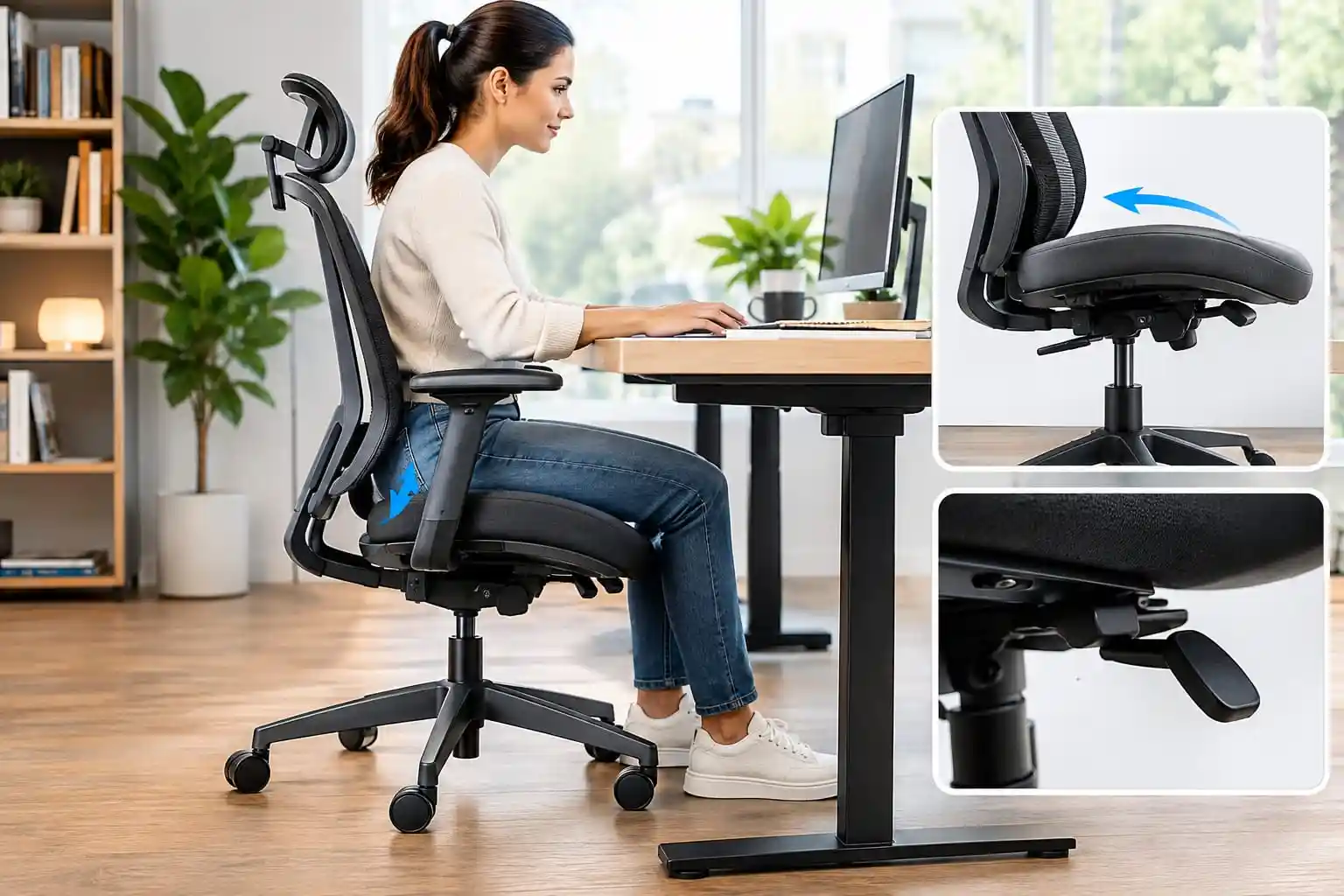
If you spend a lot of time typing, writing, coding, drawing, reading, or working closely at your desk, you may notice that you naturally lean slightly forward.
The problem is that many standard office chairs are mainly designed around upright sitting and reclining. They may not offer an adjustment specifically designed for task-focused, forward-leaning work.
This is where an office chair with forward tilt can be useful.
A forward tilt function changes the angle of the seat or seating position so you can work in a more forward-oriented posture when needed. Some ergonomic task chairs offer a dedicated forward seat angle, while others include advanced forward tilt as part of their mechanism.
However, forward tilt is only one feature to consider. The best office chair should also provide appropriate seat comfort, lumbar support, armrest adjustment, seat depth, and other adjustments that suit your body and desk setup.
In this guide, we’ll look at some of the best office chairs with forward tilt available for U.S. buyers in 2026 and explain how this feature actually works.
Quick Comparison of the Best Office Chairs with Forward Tilt
| Office Chair | Best For | Forward Tilt | Lumbar Support | Armrests | Seat Adjustability | Price | Check Price |
|---|---|---|---|---|---|---|---|
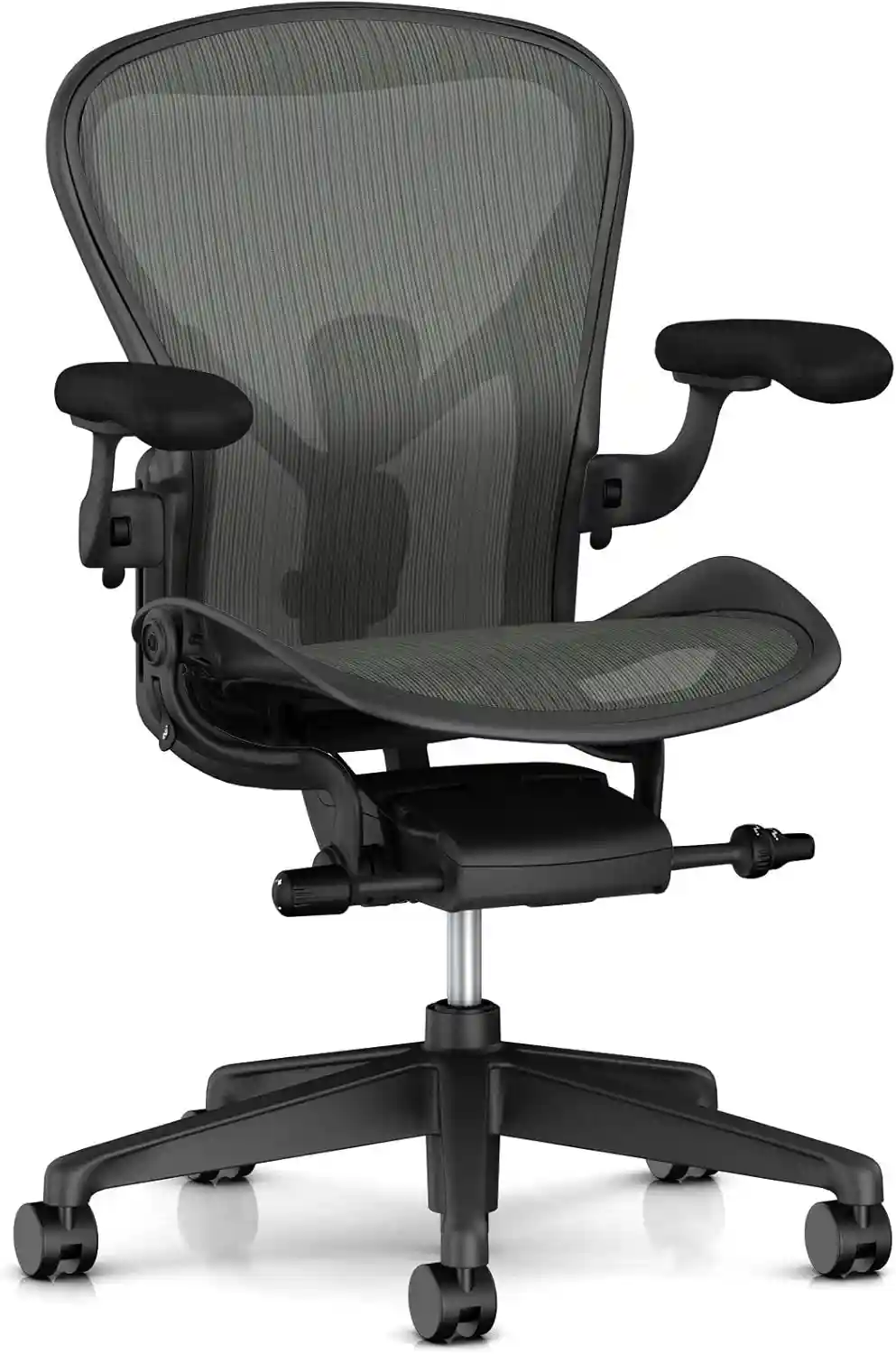 Herman Miller Aeron
|
Best Overall | ✓ Yes 5° forward seat angle option | PostureFit SL / Lumbar options | Adjustable | Height + seat angle options | Premium | Check Current Price |
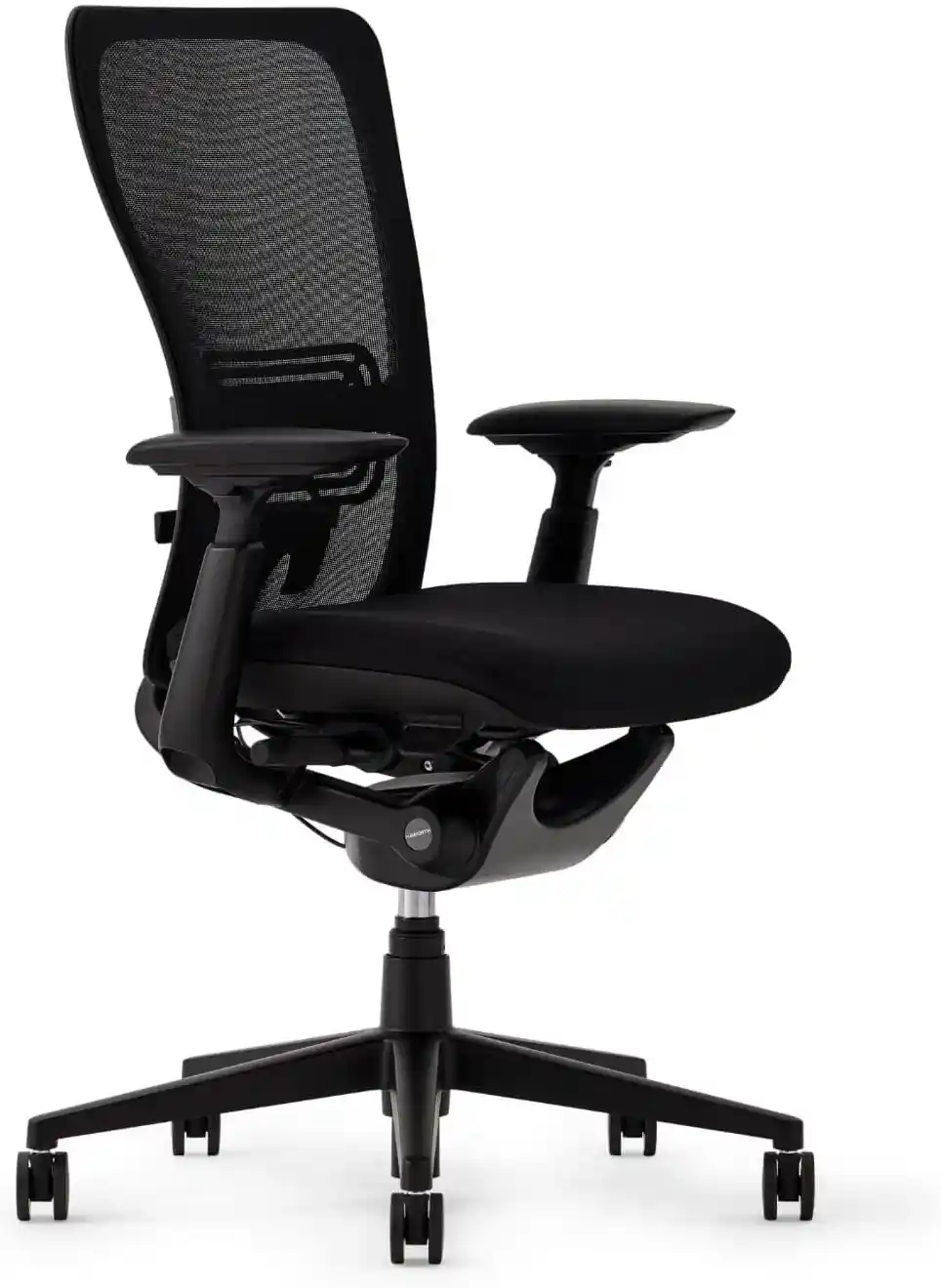 Haworth Zody
|
Best for Adjustability | ✓ Yes Forward tilt | Adjustable lumbar | 4D options | Height + seat depth | Mid–Premium | View Chair |
 Haworth Soji
|
Best Value Premium | ✓ Yes Optional 5° forward tilt | Adjustable lumbar options | 4D options | Height + 2.5″ seat depth option | Mid–Premium | Check Availability |
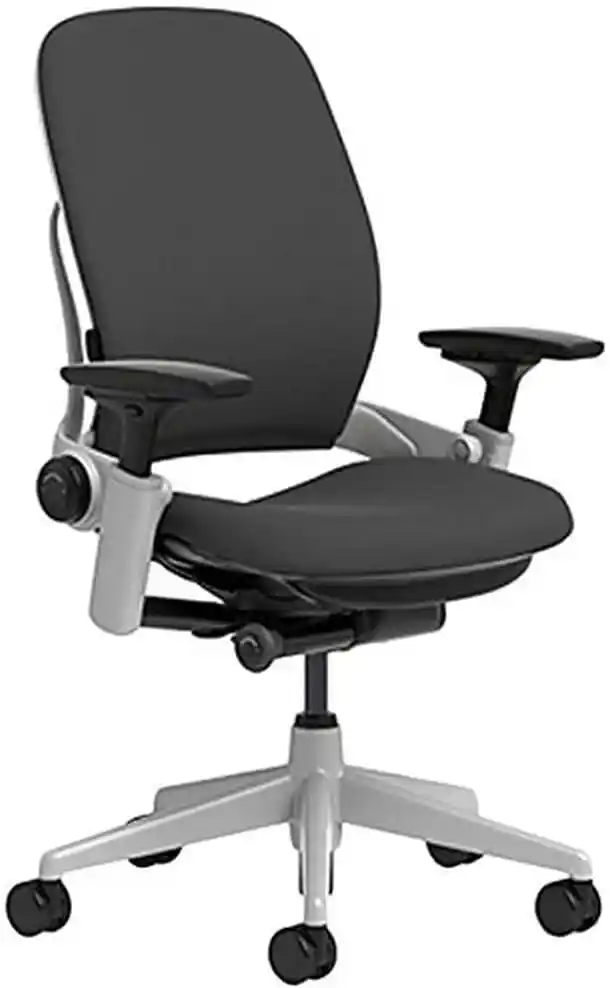 Steelcase Leap
|
Best for Adjustability | Check Configuration Verify exact model | Adjustable | Highly adjustable | Height + seat depth | Premium | See Latest Price |
Affiliate disclosure: Some links on this page may be affiliate links, which means we may earn a commission if you make a purchase through them, at no additional cost to you. Product features and configurations can vary, so check the manufacturer’s current specifications before purchasing.
Important: Office chair features can change based on the model and configuration. Always check the exact product listing before ordering.
What Is Forward Tilt on an Office Chair?
Forward tilt is an office chair adjustment that changes the seating angle toward the front.
For example, instead of keeping the seat completely level, a chair with a forward tilt function may angle the seat forward slightly. This can create a more task-focused sitting position for activities such as typing, writing, or detailed desk work.
Think of it this way:
- A standard upright chair keeps you in a neutral sitting position.
- Recline moves your body backward.
- Forward tilt moves the seating position slightly forward.
- Seat depth moves the seat forward or backward to accommodate different leg lengths.
These features are not the same.
Forward Tilt vs Recline
Recline is designed for leaning backward. Forward tilt is designed for a more forward-oriented working position.
Some chairs have both features, allowing you to change positions depending on what you are doing.
Forward Tilt vs Standard Seat Tilt
The terminology can sometimes be confusing because manufacturers use different names.
A standard tilt mechanism may allow the chair to move backward and forward dynamically. A dedicated forward tilt or forward seat angle specifically allows a forward-oriented position.
For example, Herman Miller describes its Aeron seat-angle feature as moving the seat from horizontal to a 5-degree forward tilt. Haworth’s Zody user documentation also describes a dedicated forward tilt function for task-intensive work.
This is why it is important not to assume that every chair with “tilt” automatically has forward tilt.
Is Forward Tilt Good for Desk Work?
Forward tilt can be useful for people who frequently work close to their desk.
This may include people who:
- Type for long periods
- Write by hand
- Draw or illustrate
- Read documents
- Code
- Edit photos or videos
- Work with detailed designs
- Lean slightly toward their keyboard
A forward-oriented position may help some users feel more engaged with their work surface.
However, it is important not to think of forward tilt as a position you must use all day.
Comfort and ergonomics vary from person to person. A chair should allow you to change positions rather than force you into one position for hours.
For many users, the best approach is to use forward tilt during focused tasks and then return to a neutral or reclined position when appropriate.
Best Office Chairs with Forward Tilt
Herman Miller Aeron — Best for Premium Ergonomic Performance
The Herman Miller Aeron remains one of the best-known premium ergonomic office chairs.
One important detail for buyers is that the Aeron should be ordered with the appropriate configuration if you specifically want forward seat angle functionality. Herman Miller describes its Tilt Limiter and Seat Angle option as allowing a 5-degree forward tilt.
This makes the Aeron worth considering for people who want forward tilt alongside a highly refined ergonomic design.
Herman Miller Aeron
A premium ergonomic office chair with a forward seat-angle option, breathable mesh, adjustable support, and multiple ergonomic adjustments.
✓ Forward Tilt Available
Check Current Price on AmazonKey Features
- Forward seat angle available on appropriate configurations
- Breathable suspended mesh
- Multiple size options
- Adjustable arm options
- Tilt limiter
- Adjustable tilt tension
- PostureFit SL or lumbar options depending on configuration
Forward Tilt Function
The Aeron’s seat-angle feature can move the seat into a forward tilt position. Herman Miller describes this as a 5-degree forward tilt.
This can be useful for keyboarding and intensive desk tasks.
Lumbar Support
The Aeron can be configured with PostureFit SL or adjustable lumbar support options.
The correct choice depends on the user’s preferred support feel.
Seat Comfort
Instead of traditional foam cushioning, the Aeron uses a suspended mesh seat.
Some people love the breathable and supportive feel. Others may prefer the softer feel of a padded office chair.
Adjustability
The Aeron offers extensive adjustment options depending on configuration, including:
- Seat height
- Tilt tension
- Tilt limiter
- Seat angle
- Arm adjustments
- Lumbar support options
Armrests
Depending on the selected model, the arms can provide adjustment for height, width, angle, and depth.
Breathability
This is one of the Aeron’s biggest strengths.
The mesh design allows excellent airflow and may be particularly appealing for users working in warm rooms.
Pros
- Excellent breathability
- Dedicated forward seat angle option
- Extensive ergonomic adjustments
- Multiple chair sizes
- Premium build quality
- Long-established ergonomic design
Cons
- Expensive
- Must choose the correct configuration
- Mesh seat feel is not for everyone
- Correct sizing is important
Best For
Professionals, programmers, home office users, and people who want a premium mesh chair with forward tilt capability.
Why We Recommend It
The Aeron stands out because forward tilt is part of a broader ergonomic system rather than being the only adjustment.
Herman Miller Aeron – Premium Forward-Tilt Office Chair
The Aeron can be configured with Tilt Limiter and Seat Angle, which provides up to a 5-degree forward seat angle for users who prefer working in a slightly forward position.
As an Amazon Associate, we may earn from qualifying purchases. Product features and pricing may vary by configuration.
Haworth Zody — Best for Adjustable Lumbar Support
The original Haworth Zody remains an interesting option for buyers who want forward tilt combined with a highly adjustable task-chair design.
Haworth documents forward tilt as one of the chair’s ergonomic features. The chair also includes seat depth adjustment, a breathable mesh back, and its PAL lumbar system on applicable models.
Haworth Zody
An adjustable ergonomic task chair designed for users who want forward tilt, seat-depth adjustment, lumbar support, and adjustable arms.
✓ Forward Tilt Available
View Chair on AmazonKey Features
- Forward tilt
- Breathable mesh back
- Seat depth adjustment
- Adjustable lumbar system
- Multiple-position back stop
- Adjustable arms depending on configuration
- Synchro tilt mechanism
Forward Tilt Function
Haworth’s Zody documentation specifically describes forward tilt as a feature for task-intensive work.
This makes it one of the more relevant choices for this article because the forward function is clearly documented.
Lumbar Support
The PAL system allows users to adjust lumbar support.
One notable feature is independent adjustment capability, allowing users to fine-tune the support.
Seat Comfort
The Zody uses a more traditional task-chair seat compared with a full mesh design.
The waterfall seat edge may appeal to users who prefer a less rigid front edge.
Adjustability
The chair can include:
- Seat height adjustment
- Seat depth adjustment
- Forward tilt
- Tilt tension
- Back stop
- Lumbar adjustment
Armrests
Depending on the version, buyers may find 4D, height-adjustable, or other arm configurations.
Breathability
The mesh back provides airflow while the seat offers a more conventional upholstered feel.
Pros
- Documented forward tilt
- Adjustable seat depth
- Breathable mesh back
- Strong ergonomic feature set
- Adjustable lumbar system
Cons
- Features depend on configuration
- Can be expensive when fully equipped
- Availability varies
Best For
Home office users and professionals who want forward tilt, lumbar adjustment, and seat-depth adjustment.
Why We Recommend It
The Zody offers a good balance between focused task support and broader ergonomic adjustability.
Haworth Zody Ergonomic Office Chair
The Haworth Zody is an adjustable task chair worth considering if you want a combination of lumbar support, seat-depth adjustment, and flexible ergonomic controls.
Check the exact configuration and current availability before ordering.
View Chair Details on Amazon →Steelcase Leap — Best for Users Who Want Extensive Adjustability
The Steelcase Leap is one of the most adjustable premium office chairs available.
However, buyers should be especially careful about terminology and exact configuration when shopping for a forward tilt office chair. The Leap is widely known for its adjustable seating, recline system, seat depth, arm adjustments, and flexible back support.
It is a strong choice for users who frequently change positions while working.
Steelcase Leap
A highly adjustable ergonomic office chair known for its flexible backrest, adjustable seat depth, lumbar support, and adjustable arms.
⚠ Verify Forward-Tilt Configuration
Check Availability on AmazonKey Features
- Dynamic back design
- Adjustable lumbar support
- Seat depth adjustment
- Adjustable armrests
- Recline adjustment
- Adjustable seating controls
Forward Tilt Function
Before purchasing, confirm the exact Leap model and seller specifications if forward tilt is your primary requirement.
This is particularly important when buying refurbished chairs because features and configurations may differ.
Lumbar Support
The Leap offers adjustable lower-back support features designed to let users personalize the chair.
Seat Comfort
The padded seat may appeal to users who prefer foam cushioning over a suspended mesh seat.
Adjustability
The Leap is particularly strong for users who want multiple adjustments rather than a one-size-fits-all chair.
Armrests
The adjustable arm system is one of the chair’s major strengths.
Breathability
The upholstered design generally does not provide the same airflow as a full mesh chair.
Pros
- Extensive ergonomic adjustments
- Adjustable seat depth
- Flexible back design
- Comfortable padded seat
- Highly adjustable arms
Cons
- Premium price
- Less breathable than full mesh
- Confirm exact forward-tilt capability before buying
Best For
People who change positions often and want a highly adjustable ergonomic chair.
Why We Recommend It
The Leap is an excellent adjustable office chair, but buyers specifically shopping for forward tilt should verify the exact model before purchase.
Haworth Soji — Best Value Premium Forward-Tilt Chair
The Haworth Soji is a strong option for users who want an ergonomic office chair with a forward tilt function without moving all the way into the highest-priced premium chair category.
The Soji is designed as an adjustable task chair and can be configured with an optional 5° forward tilt. It also offers useful adjustments such as seat depth, lumbar support, and adjustable armrests depending on the configuration.
This makes the Soji particularly interesting for people who spend long periods typing, writing, programming, reading, or doing other focused desk work.
Haworth Soji
A highly adjustable ergonomic task chair with a 5° forward tilt option, breathable mesh, adjustable lumbar support, and seat-depth adjustment.
✓ 5° Forward Tilt
Check Current Price on AmazonKey Features
- Optional 5° forward tilt
- Adjustable seat height
- Seat-depth adjustment option
- Adjustable lumbar support options
- Breathable mesh back
- Adjustable armrest options
- Synchro-tilt mechanism
- Multiple configuration choices
Forward Tilt Function
The Haworth Soji can be configured with an optional 5° forward tilt.
This feature changes the seat angle toward the front and can be useful when you are working closely at a desk, typing, writing, or concentrating on detailed tasks.
Forward tilt is different from reclining. Instead of moving backward, the seat moves into a more forward-oriented working position.
Because forward tilt is an option rather than a standard feature on every configuration, check the exact chair specifications before purchasing.
Lumbar Support
The Soji is available with adjustable lumbar support options.
This allows users to customize the amount and position of support based on their individual preferences.
As with any office chair, lumbar support should feel comfortable and should not be treated as a solution for a medical condition.
Seat Comfort
The Soji uses an upholstered seat combined with a breathable mesh back.
This gives it a different feel from fully mesh chairs such as the Herman Miller Aeron.
The padded seat may appeal to users who prefer a more traditional office-chair seating surface while still wanting good airflow through the backrest.
Adjustability
One of the Soji’s strengths is its range of ergonomic adjustments.
Depending on the selected configuration, users can adjust features such as:
- Seat height
- Seat depth
- Forward tilt
- Recline/tilt behavior
- Lumbar support
- Armrest position
The optional seat-depth adjustment can be particularly useful for users who need more flexibility in fitting the chair to their leg length.
Armrests
The Soji can be configured with adjustable armrests, including more advanced 4D arm options.
Adjustable arms can help users position their elbows and forearms more comfortably while typing or using a mouse.
The exact armrest features depend on the configuration you purchase.
Breathability
The mesh back provides good airflow, making the Soji a practical option for a home office or workspace where you prefer a breathable backrest.
However, the seat itself is upholstered rather than fully mesh.
Pros
- Optional 5° forward tilt
- Adjustable seat depth option
- Adjustable lumbar support options
- Breathable mesh back
- Multiple armrest configurations
- Strong ergonomic adjustability
- More traditional padded seat feel
Cons
- Forward tilt is optional
- Features vary by configuration
- Premium pricing compared with basic office chairs
- Upholstered seat is less breathable than a fully mesh chair
- Availability and pricing can vary by seller
Best For
The Haworth Soji is best for programmers, writers, designers, students, home-office workers, and other users who want an adjustable ergonomic chair for focused desk work.
It is especially worth considering if you want forward tilt but also want features such as seat-depth adjustment and adjustable lumbar support.
Why We Recommend It
The Haworth Soji stands out because it combines a 5° optional forward tilt with a broader range of ergonomic adjustments.
Instead of buying a chair simply because it has forward tilt, you can use the Soji’s other adjustments to fine-tune the seating position to your body and workstation.
It is also a good middle-ground option for someone who likes the idea of a premium ergonomic chair but prefers an upholstered seat with a breathable mesh back.
If forward tilt is your main reason for buying the chair, make sure the exact configuration you select includes the forward-tilt option before placing your order.
Best Overall Office Chair with Forward Tilt
Winner: Herman Miller Aeron
The Herman Miller Aeron is our best overall choice for buyers who want a premium ergonomic office chair with a properly documented forward seat-angle option.
Its biggest strengths include:
- Forward tilt capability
- Excellent breathability
- Multiple size options
- Extensive adjustment options
- Premium materials and construction
It is particularly suitable for people who work long hours and want both focused upright positioning and the ability to change posture.
However, it is not the right choice for everyone.
The price is high, the mesh seat has a distinctive feel, and selecting the right size and configuration is important.
If you prefer a more traditional padded task chair, the Haworth Zody or another adjustable upholstered chair may be a better match.
Best Budget Office Chair with Forward Tilt
Best Value Approach: Look for Verified Configurations
True, dedicated forward tilt is still uncommon in low-cost office chairs.
Many budget chairs advertise:
- Tilt
- Rocking
- Recline
- Tilt lock
But these features do not automatically mean forward tilt.
For this reason, we do not recommend naming a cheap chair as the best budget forward-tilt chair unless the manufacturer clearly documents the feature.
A better strategy for budget buyers is to:
- Check for a manufacturer-documented forward tilt.
- Consider refurbished premium task chairs.
- Compare warranty and return policies.
- Avoid assuming “multi-tilt” means forward tilt.
For many buyers, a refurbished or discounted Haworth Zody may provide better value than a new budget chair with unclear specifications.
Best Premium Office Chair with Forward Tilt
Winner: Herman Miller Aeron
The Aeron is our premium recommendation.
Its strengths include:
- Refined ergonomic design
- Breathable mesh
- Forward seat angle option
- Extensive adjustment system
- Multiple size options
Warranty coverage should always be checked for the exact chair and seller, especially when buying through marketplaces or purchasing refurbished furniture.
An expensive chair is not automatically the best chair for every person. Fit, seat feel, body size, desk height, and work habits still matter.
Forward Tilt vs Recline: What’s the Difference?
| Feature | Forward Tilt | Recline |
|---|---|---|
| Sitting Position | More forward-oriented | Leaning backward |
| Direction of Movement | Forward | Backward |
| Best Use | Typing and focused desk work | Relaxing and changing position |
| Typing and Desk Work | Often useful for focused tasks | Can be useful depending on setup |
| Relaxing | Less suitable | More suitable |
| Posture Changes | Supports forward-focused work | Supports backward movement and posture variation |
Forward tilt and recline are not competing features.
A good ergonomic office chair may offer both so users can change positions throughout the day.
Forward Tilt vs Seat Depth Adjustment
Forward tilt and seat depth adjustment are completely different features.
What Forward Tilt Does
Forward tilt changes the angle of your seating position.
What Seat Depth Does
Seat depth adjustment moves the seat pan forward or backward.
This helps accommodate different leg lengths.
For example, a shorter user may need a shallower seat, while a taller user may prefer more seat depth.
Both features can be useful, but one does not replace the other.
Your body size and desk setup should influence how you adjust the chair.
Related guide:
Office Chair with Adjustable Seat Depth →
Who Should Consider an Office Chair with Forward Tilt?
A forward tilt office chair may be worth considering for:
Programmers
Programming often involves focused keyboard and screen work.
Writers
Writers may shift between typing, reading notes, and reviewing documents.
Designers
Designers sometimes work closely with screens, tablets, and detailed visual projects.
Students
Students may spend long periods reading, writing, and typing.
Artists
Artists and illustrators may lean toward a drawing surface during detailed work.
Office Workers
People who frequently work with documents and keyboards may appreciate the ability to change seating positions.
People Who Lean Toward Their Desk
If you naturally lean slightly forward while concentrating, a dedicated forward tilt may be worth exploring.
However, not everyone needs this feature.
If you rarely lean forward or prefer a more neutral or reclined working position, a good ergonomic chair without forward tilt may still be an excellent choice.
How to Use Forward Tilt Correctly
Forward tilt should be part of your overall chair setup.
1. Adjust Seat Height
Set the chair so your feet can rest comfortably on the floor or a suitable footrest.
2. Adjust Seat Depth
Leave enough space between the front edge of the seat and the back of your knees.
3. Position Lumbar Support
Adjust the support so it feels comfortable rather than overly aggressive.
4. Adjust Armrests
Set armrests so they support your arms without forcing your shoulders upward.
5. Activate Forward Tilt When Needed
Use forward tilt for focused desk work if it feels comfortable.
6. Position Your Keyboard and Mouse
Keep frequently used items close enough that you do not have to constantly reach forward.
7. Check Monitor Height
Position your monitor to support comfortable viewing rather than repeatedly bending your neck.
8. Change Positions Regularly
Avoid treating any single chair position as the only position you should use all day.
Related guide:
How to Adjust Your Office Chair for Perfect Posture →
Buying Guide: What to Look for Besides Forward Tilt
Adjustable Seat Height
A chair should allow you to adjust the seat to your desk and body.
Seat Depth
Seat depth can make a major difference in how well the chair fits your legs.
Lumbar Support
Look for lumbar support that suits your preferred level of support.
Adjustable Armrests
Height-adjustable arms are useful, while multi-directional armrests provide more customization.
Recline Function
Recline gives you another way to change position during the day.
Seat Cushion
Some users prefer mesh. Others prefer foam or upholstered cushioning.
Breathable Material
Mesh can provide better airflow, particularly in warm environments.
Weight Capacity
Always check the manufacturer’s specifications.
Warranty
A longer warranty can be valuable for an expensive office chair, but terms vary by manufacturer and seller.
Return Policy
Comfort is personal. A good return policy can be particularly important when buying a chair online.
Related guides:
How to Choose an Ergonomic Chair →
Best Office Chair for Long Hours →
Common Mistakes When Buying an Office Chair
Buying Based Only on Appearance
A beautiful chair may not fit your body or work style.
Ignoring Body Size
Seat depth, height range, and overall chair dimensions matter.
Confusing Forward Tilt with Recline
Always read the manufacturer’s description.
Ignoring Seat Depth
A good chair can still feel uncomfortable if the seat depth does not fit you.
Choosing Fixed Armrests
Fixed arms may limit your ability to position the chair properly at your desk.
Ignoring the Return Policy
You cannot always know how a chair will feel until you use it.
Buying a Chair Only Because It Is Cheap
A very cheap chair with limited adjustments may not provide the value you expect.
Frequently Asked Questions
What is forward tilt on an office chair?
Forward tilt changes the seating position toward the front. It can support a more task-focused position for activities such as typing, writing, and detailed desk work.
Is forward tilt better for typing?
Some users find forward tilt useful for typing and focused desk work. However, comfort varies, and it should not be considered automatically better for everyone.
What is the difference between forward tilt and recline?
Forward tilt creates a more forward-oriented seating position. Recline moves your body backward.
Do all ergonomic chairs have forward tilt?
No. Many ergonomic chairs have recline or tilt mechanisms but do not offer dedicated forward tilt.
Is forward tilt useful for long hours?
It can be useful as one of several positions during a long workday. Most people benefit from changing positions rather than staying in one posture continuously.
Can I use forward tilt all day?
You can use it if it feels comfortable, but it is generally a good idea to vary your sitting position during the day.
What other chair adjustments should I look for?
Consider seat height, seat depth, lumbar support, armrests, recline, tilt tension, and backrest adjustment.
Final Verdict
The best office chair with forward tilt depends on your body, budget, desk setup, and working style.
Best Overall: Herman Miller Aeron
Best for buyers who want a premium ergonomic chair with a documented forward seat-angle option and excellent breathability.
Best Budget Approach: Verified Refurbished Task Chair
Dedicated forward tilt is uncommon in inexpensive chairs. A verified refurbished premium task chair may offer better value than a cheap chair with unclear specifications.
Best Premium: Herman Miller Aeron
A strong option for buyers who want premium construction, mesh airflow, extensive adjustability, and forward tilt.
The most important thing to remember is this: the best office chair is not simply the chair with the most features.
The right chair should fit your body, work style, desk setup, and budget.
Forward tilt can be a valuable feature for people who frequently type, write, draw, or lean toward their desk. But it works best when combined with other important adjustments such as seat depth, lumbar support, armrests, and seat height.
Before buying, always confirm the exact chair configuration and check the manufacturer’s specifications.
Ready to Compare Your Next Office Chair?
Check the latest chair configurations, customer reviews, availability, and current pricing before making your decision.
See Latest Price on Amazon →For more buying help, you may also like:
Best Office Chair for Programmers →