Choosing an office chair is about more than seat padding, back support, or how attractive the chair looks. One small feature can make a surprisingly big difference in everyday comfort: the armrests.
Many people buy an ergonomic office chair and still experience shoulder tension, wrist discomfort, or upper-back fatigue during long work sessions. Sometimes, the issue isn’t the chair itself. Armrests that are too high, too low, too wide, or poorly positioned can make it harder to maintain a comfortable working position.
So, when comparing fixed armrests vs adjustable armrests, which option is better?
The answer depends on your body size, desk height, working habits, budget, and how much customization you need. Fixed armrests can be perfectly suitable when they fit your workstation correctly, while adjustable armrests offer considerably more flexibility.
This guide explains the differences, benefits, limitations, and buying considerations so you can choose the right setup for your workspace.
Affiliate Disclosure: This article may contain affiliate links. If you purchase through one of these links, we may earn a commission at no additional cost to you. Our recommendations are based on useful features and suitability rather than commission alone.
Fixed Armrests vs Adjustable Armrests: Quick Comparison
| Feature | Fixed Armrests | Adjustable Armrests |
|---|---|---|
| Height adjustment | No | Yes |
| Width adjustment | Usually No | Often Yes |
| Angle adjustment | No | Some models |
| Comfort customization | Limited | High |
| Price | Usually lower | Usually higher |
| Best for | Simple setups | Ergonomic setups |
| Long-hour use | Depends on fit | Usually better |
| Small desk setup | Depends | Often better |
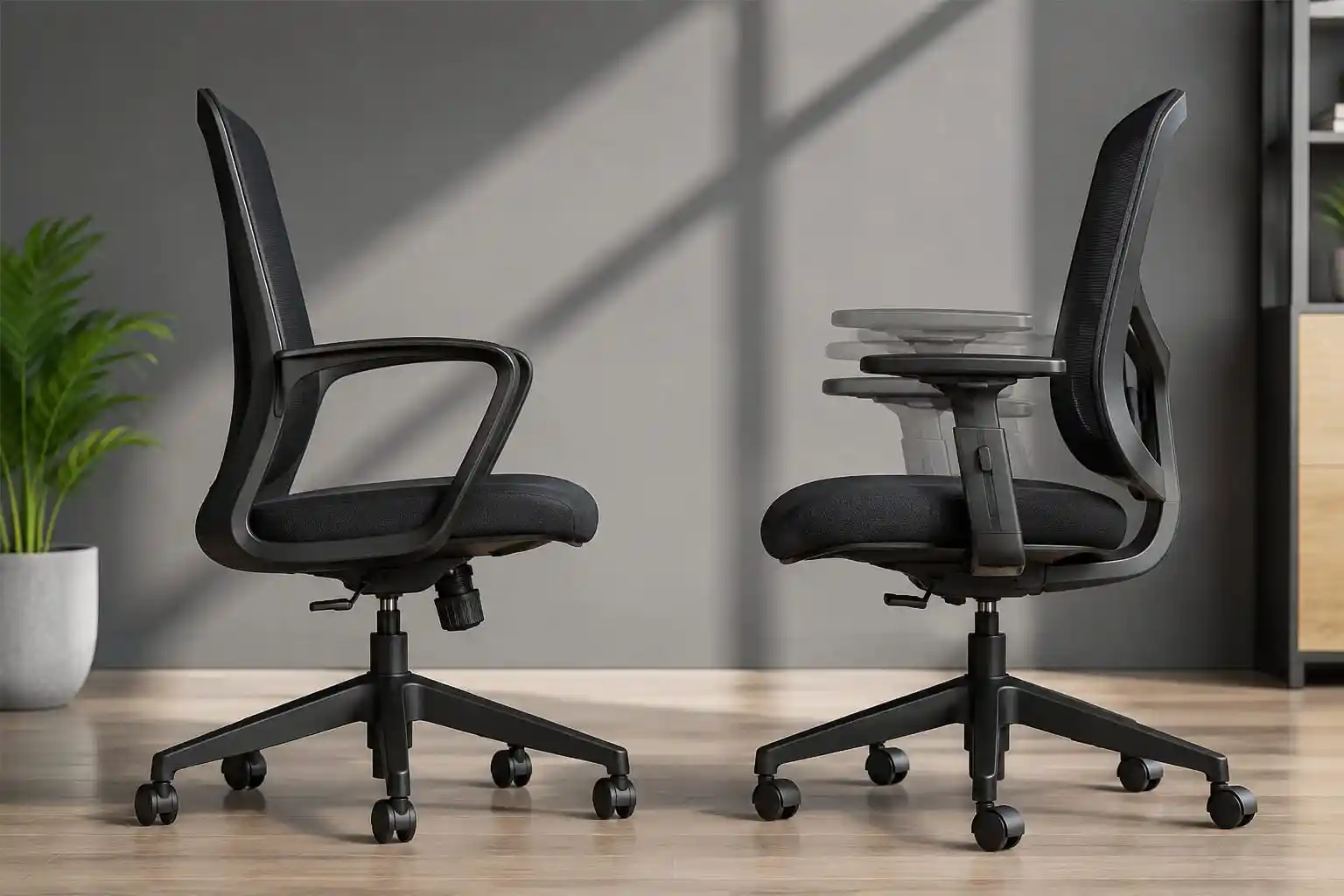
The biggest difference is customization. A fixed armrest has a predetermined position, while an adjustable armrest office chair allows you to change the position to better match your body and workstation.
However, more adjustments don’t automatically make a chair better. The adjustment range, stability, padding, and compatibility with your desk all matter.
What Are Fixed Armrests?
Fixed armrests are attached to the chair in one position and generally cannot be moved up, down, forward, backward, or sideways.
Manufacturers commonly use fixed armrests because they are simple, durable, and relatively inexpensive to produce. They can work very well when the armrest height and width happen to match the user’s body and desk.
For example, if you have a standard-height desk and find that your elbows naturally rest at a comfortable position when seated, a fixed armrest office chair may provide everything you need.
Fixed Armrest Benefits
Simple design: There are fewer mechanisms to operate, making fixed armrests straightforward to use.
Usually less expensive: Chairs with fixed arms are often available at lower prices than similarly designed chairs with multiple adjustment mechanisms.
Fewer moving parts: A simpler design can mean fewer adjustment mechanisms to maintain or accidentally loosen.
Often sturdy: Fixed armrests can feel solid because the arm structure does not need to accommodate multiple adjustment points.
Easy to use: Once positioned correctly, you simply sit down and use them without making adjustments.
Fixed Armrest Cons
The biggest weakness is limited customization.
A fixed armrest may be too high for one user and comfortable for another. It may also work with one desk but interfere with another.
This can be particularly important if multiple people use the same chair or if you frequently switch between different workstations.
Users with shorter or taller body proportions may also have more difficulty finding a fixed armrest that provides a comfortable fit.
What Are Adjustable Armrests?
Adjustable armrests allow you to change one or more aspects of the armrest position.
Depending on the chair, you might be able to adjust the height, width, depth, or angle. Some armrests can also pivot inward or outward to provide a more natural position for different tasks.
This makes an office chair with adjustable arms particularly useful when you spend many hours working at a desk.
1D Armrests
1D armrests generally provide one major adjustment, most commonly height.
This is a useful upgrade over fixed armrests because users can raise or lower the arm support to match their elbow position.
2D Armrests
2D armrests usually provide height adjustment plus another movement, such as width or pivot adjustment.
However, manufacturers do not always use the term “2D” in exactly the same way, so check the product description carefully.
3D Armrests
3D armrests generally provide three types of movement, commonly height, depth or width, and pivot/angle adjustment.
They provide more flexibility for people who want to fine-tune their arm position.
4D Armrests
4D armrests generally offer four adjustment directions, such as height, width, depth, and angle.
They are commonly found on more feature-rich ergonomic chairs.
Keep in mind that 2D vs 3D vs 4D armrests is not a universal industry standard. Different manufacturers may define these categories differently. Always check the actual adjustment specifications instead of buying a chair simply because it says “4D.”
Benefits of Adjustable Armrests
The main advantage of adjustable armrests is customization.
Better Customization
Everyone has different proportions. Adjustable arms make it easier to position the armrests around your body rather than forcing your body to adapt to the chair.
Easier Elbow Positioning
A properly positioned armrest can provide comfortable support for your forearms while you are sitting normally.
Better Fit for Different Body Sizes
An adjustable armrest office chair can be especially useful when fixed armrests don’t provide enough height or width flexibility.
Useful for Long Working Sessions
If you spend six, eight, or more hours at a desk, small ergonomic differences can become more noticeable over time. Adjustable arms allow you to fine-tune your setup instead of being locked into one position.
Easier Desk Compatibility
Different desks have different heights and designs. Adjustable armrests give you more flexibility when matching your chair to your desk.
More Flexibility for Keyboard and Mouse Work
Typing and mouse use may require slightly different arm positions. Pivoting or depth-adjustable armrests can make it easier to find a comfortable position for each activity.
Fixed vs Adjustable Armrests for Posture
Armrests are only one part of an ergonomic workstation, but their position can influence how you hold your upper body.
For example, armrests that are too high may encourage you to raise your shoulders. Armrests that are too low may provide little useful support. Armrests that are too wide can require your arms to move away from your body.
A comfortable setup generally allows your shoulders to remain relaxed while your elbows stay in a natural position.
Your keyboard, mouse, desk, monitor, seat height, backrest, and sitting position also matter.
This is why adjustable armrests should not be viewed as a solution that automatically fixes posture or back discomfort. Good ergonomics comes from the entire workstation working together.
Which Is Better for Long Hours?
For people working 6 hours per day, adjustable armrests can provide useful flexibility, particularly when the chair and desk aren’t perfectly matched.
For 8-hour workdays, adjustability becomes even more valuable because you spend a significant amount of time in the same workstation.
For people working 10+ hours, the ability to fine-tune arm position can be especially convenient. However, armrests alone won’t make prolonged sitting healthy or comfortable. Taking regular breaks, changing positions, and maintaining a properly configured workstation remain important.
Fixed armrests can still work for long hours if their height, width, padding, and position already suit your body and desk.
The key isn’t simply whether the armrests move. The key is whether they allow you to maintain a comfortable working position.
Fixed vs Adjustable Armrests for Different Users
Best for Shorter Users
Shorter users should pay close attention to armrest height.
If fixed arms sit too high, the user may have difficulty resting their arms comfortably without elevating the shoulders. A chair with a useful height-adjustment range can provide a better fit.
Best for Taller Users
Taller users should look for sufficient adjustment range rather than simply choosing a chair labeled “ergonomic.”
The armrests should provide enough height and positioning flexibility to work with the user’s proportions and desk.
Best for Remote Workers
Remote workers often spend a large part of the day at one workstation. Adjustable arms can be useful when working on a laptop, desktop computer, or different desk configurations.
Best for Gamers
Gamers frequently use a keyboard and mouse for extended periods. Adjustable armrests can provide additional flexibility for positioning the arms close to the desk.
Best for Office Professionals
For people who spend much of the day typing, writing, and using a mouse, adjustable armrests can make it easier to customize the position of the arms.
Best for Budget Buyers
Fixed armrests can be a sensible choice for budget-conscious buyers if the chair already fits properly.
There’s no reason to pay extra for multiple adjustment mechanisms that you won’t use.
How to Adjust Office Chair Armrests Correctly
Proper office chair armrest adjustment doesn’t need to be complicated.
1. Sit Normally
Start by sitting in your usual working position rather than leaning forward or slouching.
2. Adjust the Seat Height
Set the chair height so your feet are comfortably supported and your workstation is at a practical height.
3. Relax Your Shoulders
Let your shoulders drop naturally. Don’t raise them just to reach the armrests.
4. Bend Your Elbows Naturally
Keep your elbows comfortably bent rather than forcing your arms into a rigid position.
5. Position the Armrests
Adjust the armrests until they can support your forearms comfortably without pushing your shoulders upward.
6. Check Your Wrists
Your wrists should remain in a comfortable, relatively neutral position while typing or using the mouse.
7. Check the Desk
Make sure the armrests don’t prevent you from getting close enough to the desk.
This is particularly important with desks that have a thick front edge or limited clearance.
8. Test While Working
Don’t judge the position after sitting for only a few seconds. Type, use your mouse, and perform normal work for several minutes before deciding whether the adjustment feels right.
What Should You Look for When Buying Armrests?
Don’t choose an office chair based solely on whether it says “adjustable armrests.”
Look at the actual design.
Height Adjustment Range
This is one of the most important specifications. A wide range can make it easier to accommodate different body sizes and desks.
Width Adjustment
Width adjustment can help position the armrests closer to or farther from your body.
Armrest Padding
Look for padding that feels comfortable without being excessively soft. The surface should provide practical support during everyday use.
Armrest Surface Size
A larger surface may give you more flexibility for supporting your forearms, but it should still allow you to work comfortably at your desk.
Pivoting Function
Pivoting arms can be useful when you want the armrests to follow the natural position of your arms during typing or mouse use.
Depth Adjustment
Forward and backward movement can help you position the arm support according to your working style.
Stability
An armrest can have many adjustment options but still be disappointing if it feels loose or unstable.
Locking Mechanism
Good adjustment controls should hold the selected position rather than constantly moving during use.
Desk Compatibility
Before buying, check whether the chair’s arms can slide under your desk. Adjustable armrests can be particularly useful for compact workstations, but only if their dimensions and range work with your desk.
Weight Capacity and Warranty
Consider the chair’s overall weight capacity and the manufacturer’s warranty terms. Armrests are part of the chair’s structural design, so durability matters.
Most importantly, prioritize the actual adjustment range over marketing labels such as “3D” or “4D.”
Fixed vs Adjustable Armrests: Which One Should You Buy?
Choose Fixed Armrests If:
- You have a tight budget.
- Your current desk and chair height already fit well.
- You have a standard workstation.
- You prefer a simple chair design.
- You don’t need frequent adjustments.
- You have found a fixed armrest position that feels comfortable.
Choose Adjustable Armrests If:
- You work long hours.
- You want more ergonomic customization.
- You frequently change desks or workstations.
- Multiple people use the chair.
- You have difficulty finding a comfortable arm position.
- You want more flexibility for typing and mouse work.
For most people who prioritize customization, adjustable arms are the more versatile choice. But “more adjustable” doesn’t automatically mean “more comfortable.” A well-designed fixed armrest can outperform a poorly designed adjustable one.
Two Office Chairs Worth Considering
Want more flexibility than fixed armrests? Compare these two SIHOO ergonomic chairs and choose the option that best fits your workstation and budget.
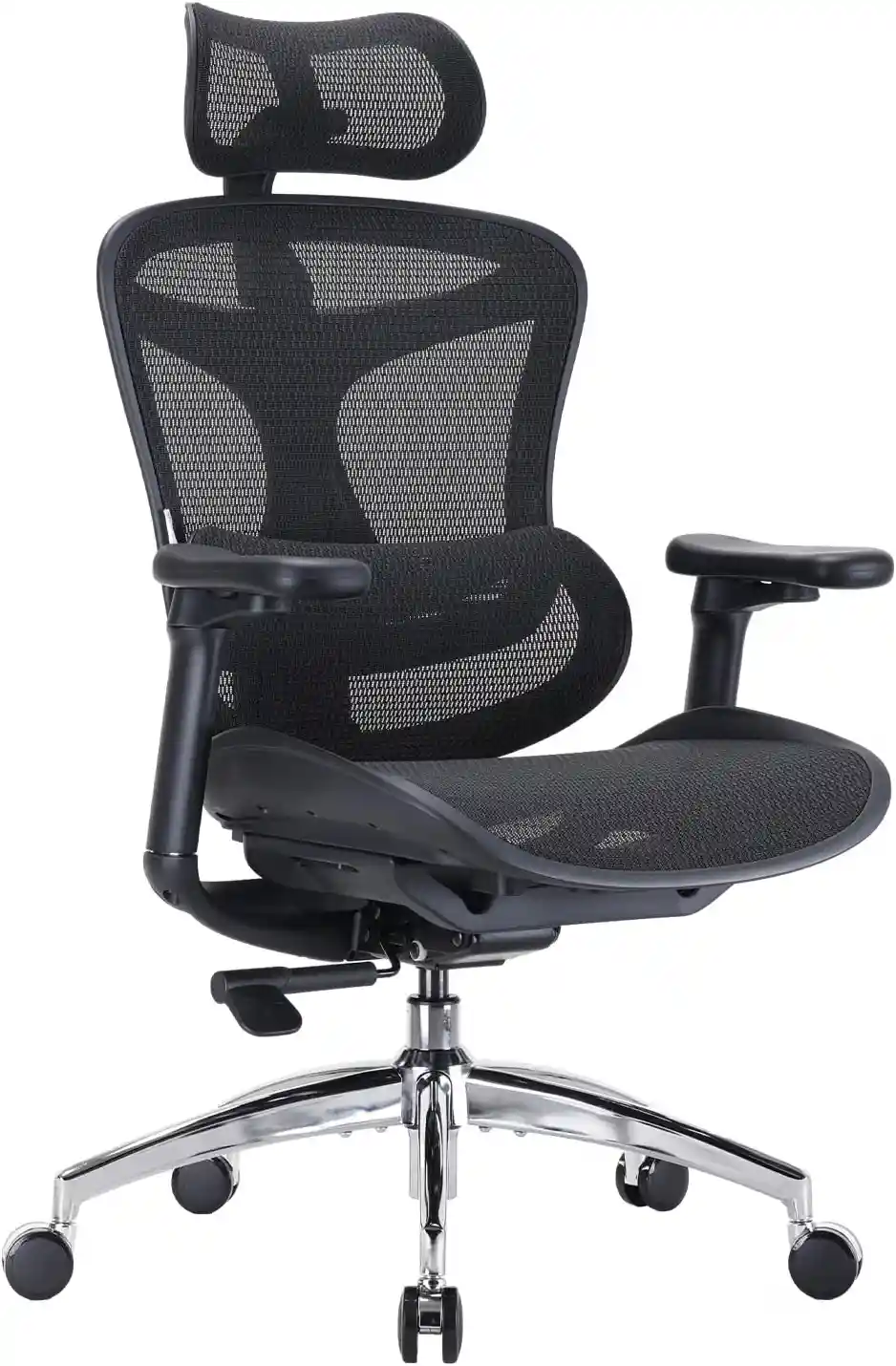
SIHOO Doro C300
A feature-rich ergonomic chair for users who want extensive armrest and workstation customization.
- 4D coordinated adjustable armrests
- Breathable mesh design
- Self-adaptive lumbar support
- Adjustable headrest
- 330-lb maximum load listed by SIHOO
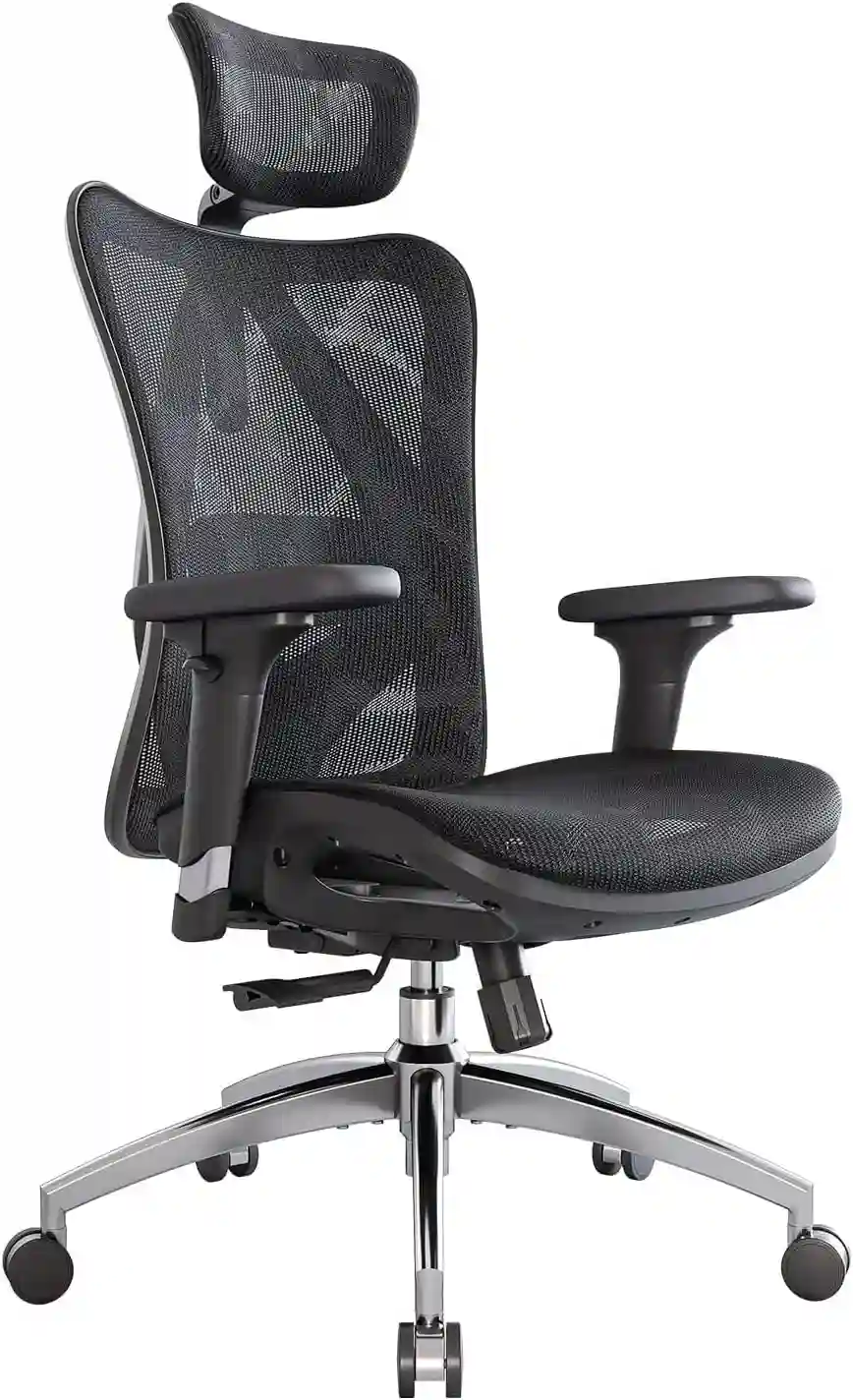
SIHOO M57
A practical ergonomic option for everyday home-office work with adjustable arm support and a breathable mesh back.
- Adjustable armrests
- Breathable mesh back
- Adjustable headrest
- Adjustable seat height
- Recline and tilt functionality
Quick Comparison
Choose the Doro C300 if maximum armrest customization is your priority. Choose the M57 if you want an ergonomic chair with adjustable arm support while keeping your feature requirements simpler.
As an Amazon Associate, we may earn from qualifying purchases. Prices, availability, product versions and specifications can change. Please verify the current listing before purchasing.
Recommended Office Chair Types
Different chair categories can suit different priorities.
Budget Ergonomic Chair
A budget ergonomic chair with height-adjustable arms can offer useful functionality without requiring a premium budget.
Mesh Ergonomic Chair
Mesh chairs are popular for home offices and warm environments. When shopping, look at the complete ergonomic package rather than focusing only on the mesh material.
Executive Chair
Executive chairs often prioritize cushioning and a larger overall design. Fixed or adjustable armrests may be available depending on the model.
High-Back Ergonomic Chair
A high-back design may provide more upper-body support, while adjustable armrests can add customization.
Premium Ergonomic Chair
Premium chairs often provide more adjustment options, but buyers should evaluate whether those features are genuinely useful for their workstation.
What to Look for in an Office Chair With Adjustable Armrests
Instead of choosing a chair solely because it has a high number of adjustments, compare the features that actually affect your workstation.
| Chair Category | Best For | Important Armrest Feature | Other Feature to Consider | Potential Drawback |
|---|---|---|---|---|
| Budget ergonomic chair | Cost-conscious users | Height adjustment | Basic lumbar support | Fewer adjustment options |
| Mesh ergonomic chair | Home offices and warm rooms | Height/pivot adjustment | Breathable backrest | Seat feel varies |
| Mid-range ergonomic chair | Daily computer work | Height + depth/width | Seat and back adjustment | Higher price |
| Premium ergonomic chair | Maximum customization | Multi-direction adjustment | Extensive ergonomic controls | Higher upfront cost |
| Executive office chair | Cushion-focused users | Stable arm support | Padded seat/back | May be less flexible |
When shopping through affiliate links, compare the manufacturer’s specifications carefully. Product designs, prices, availability, and features can change, so verify the current information before purchasing.
Two Office Chairs Worth Considering
Want more flexibility than fixed armrests? Compare these two SIHOO ergonomic chairs and choose the option that best fits your workstation and budget.
SIHOO Doro C300
A feature-rich ergonomic chair for users who want extensive armrest and workstation customization.
- 4D coordinated adjustable armrests
- Breathable mesh design
- Self-adaptive lumbar support
- Adjustable headrest
- 330-lb maximum load listed by SIHOO
SIHOO M57
A practical ergonomic option for everyday home-office work with adjustable arm support and a breathable mesh back.
- Adjustable armrests
- Breathable mesh back
- Adjustable headrest
- Adjustable seat height
- Recline and tilt functionality
Quick Comparison
Choose the Doro C300 if maximum armrest customization is your priority. Choose the M57 if you want an ergonomic chair with adjustable arm support while keeping your feature requirements simpler.
As an Amazon Associate, we may earn from qualifying purchases. Prices, availability, product versions and specifications can change. Please verify the current listing before purchasing.
FAQs
Are adjustable armrests worth it?
They can be worth the extra cost if you work long hours, have a non-standard desk height, share your chair, or want more control over your sitting position. If your fixed armrests already fit you well, however, additional adjustment may not be necessary.
Are fixed armrests bad for posture?
No. Fixed armrests are not automatically bad for posture. The important factor is whether their position works with your body and workstation. Poorly positioned fixed arms can be inconvenient, but a well-fitting fixed armrest can be perfectly comfortable.
What is the difference between 2D, 3D, and 4D armrests?
These labels generally describe the number of adjustment directions available. 2D may offer height plus another movement, while 3D and 4D typically provide progressively more adjustment options. Because manufacturers use these terms differently, always check the specific functions.
Should office chair armrests be higher or lower?
They should generally be positioned so your shoulders can remain relaxed while your elbows and forearms are comfortably supported. If you have to raise your shoulders to reach the armrests, they are likely too high.
Can armrests be added to an office chair?
Sometimes, but compatibility varies. Replacement armrests need to match the chair’s mounting points, dimensions, and structural design. Universal aftermarket arms may not fit every chair safely or correctly. Check the chair manufacturer’s replacement parts before modifying the chair.
Final Verdict: Fixed or Adjustable Armrests?
When comparing fixed armrests vs adjustable armrests, adjustable armrests generally offer more flexibility and are often the better choice for people who spend long hours working at a computer.
They make it easier to customize arm height, width, depth, or angle and can accommodate different body sizes and workstation configurations.
However, fixed armrests aren’t automatically inferior. If your chair, desk, and body dimensions already work well together, a fixed armrest can provide comfortable, stable support while keeping the chair simpler and often less expensive.
The best office chair armrests are ultimately the ones that allow you to work comfortably without forcing your shoulders, elbows, or wrists into awkward positions.
Before buying, focus less on the number of adjustment dimensions and more on whether the adjustment range actually fits your body and desk. A chair with useful, stable adjustments is more valuable than one with impressive-sounding features that you never use.
For most remote workers, office professionals, and anyone spending many hours at a computer, an office chair with adjustable arms is a strong choice. For straightforward workstations and budget-focused buyers, a properly fitted fixed armrest chair can still be an excellent option.